
In this article
Whop clipping pays for views, not followers.
Brands and creators fund clipping campaigns on Content Rewards, a marketplace that began as an app inside Whop. You cut their long videos into short clips, post them on your own accounts, and earn a set rate per 1,000 views once a clip is approved. No face. No audience. No product of your own. The catch: pay follows reach, and YouTube just cut reach for barely changed clips.
What You’ll Need
- You must be 18 or older. The Content Rewards Creator Terms bar anyone under 18, even with parental consent.
- Short-form accounts you control. Whop’s Content Rewards docs list TikTok, YouTube Shorts, Instagram Reels, and X for clipping. Instagram must be a Professional or Creator account to connect.
- A Whop account. Whop handles sign-in and withdrawals. Before you withdraw, you complete a KYC check that asks you to link a bank and upload ID, per Whop’s payout docs.
- A vertical video editor. CapCut, DaVinci Resolve, or Premiere Pro all work. An AI auto-clipper can find moments, but read Step 6 before you trust its output.
- A notes file per campaign. Rate, minimum, cap, platforms, and rules. You will check it every time you post.
Step 1: Understand What Whop Clipping Actually Is
Whop clipping is a pay-per-view content job. A brand or creator, such as a podcaster or streamer, sets up a campaign with a budget and a rate per 1,000 views. Clippers turn that long-form footage into short clips and get paid on the views those clips earn.
Whop’s docs describe two campaign types:
- Clipping: “Creators turn your existing long-form content (podcasts, livestreams, webinars) into short clips.”
- User-generated content (UGC): you make original content that features the brand. Whop notes that UGC typically pays higher rates than clipping.
One change matters if you read older guides. Content Rewards now runs its own web app. Its Creator Terms, last updated October 4, 2026, name Content Rewards Inc as the operator. Whop handles sign-in, payments, withdrawals, and identity checks. Campaigns you joined on the older Whop-hosted version stay under the prior terms.
So “Whop clipping” today means Content Rewards campaigns, paid out through Whop.
Why faceless creators care: you never appear on camera, and you need no audience to start. The source creator supplies the footage and the demand. You supply the edit and the distribution. The rest of this guide covers how to make money clipping there, from content clipping basics to picking clipping jobs that pay.
Step 2: Learn Exactly How the Pay Works
Read the money rules before you cut a single clip. Each one changes what a view is worth.
Per Whop’s setup docs, the campaign owner sets four numbers:
- Reward rate: what you earn per 1,000 views.
- Minimum payout: what a clip must earn before it reaches review. Whop’s example: a $3 rate with a $6 minimum means only clips with 2,000 or more views get reviewed.
- Maximum payout: a cap per clip. Whop’s example: a $3,000 cap at $3 per 1,000 stops earnings at 1 million views.
- Flat fee bonus (optional): a fixed amount per approved clip, on top of view pay.
The Creator Terms add the parts Whop’s setup page leaves out:
- A 10% creator fee on every CPM and Pool campaign payout. Per-post and retainer campaigns charge 10% under a $5,000 budget and 0% at $5,000 or more.
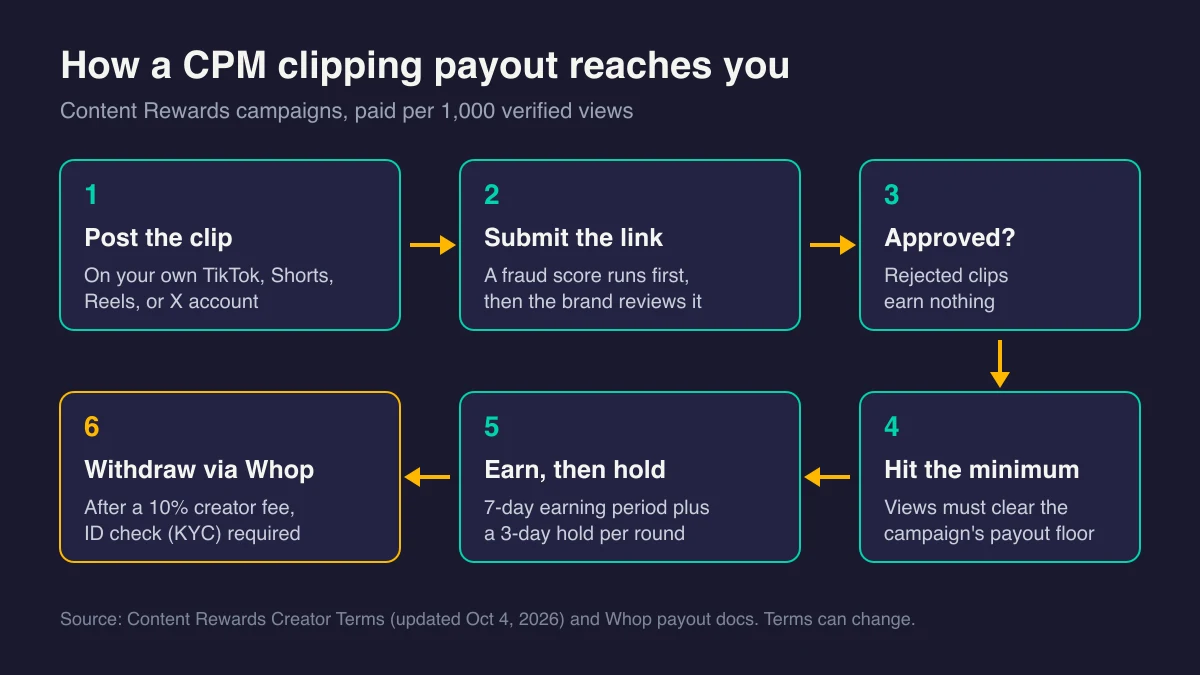
- Payout rounds: a 7-day earning period, then a 3-day hold. A round settles about 10 days after it opens.
- An earning window: recurring CPM pay normally ends 30 days after a clip first meets its minimum, or when its tracking window ends, whichever comes first. Views after that earn nothing.
- Finite budgets: CPM campaigns start at a $1,000 minimum budget. When a budget runs dry, unpaid earnings wait for new funds, and the terms say they cannot be paid if funds never arrive.
Here is the math with Whop’s own example settings. It is arithmetic, not a typical campaign or a forecast:
| Views on one clip | Gross at $3 per 1,000 | Clears the $6 minimum? | After the 10% creator fee |
|---|---|---|---|
| 1,500 | $4.50 | No | $0 |
| 2,000 | $6.00 | Yes | $5.40 |
| 10,000 | $30 | Yes | $27 |
| 100,000 | $300 | Yes | $270 |
| 1,000,000 | $3,000 (cap reached) | Yes | $2,700 |
| 3,000,000 | $3,000 (still capped) | Yes | $2,700 |
A clip below the minimum earns nothing unless its views pass the minimum within the tracking window.
Neither Whop nor Content Rewards publishes a typical rate. Each campaign lists its own. Third-party guides quote averages, but none we found shows its method, so we do not repeat them here.
Step 3: Set Up Accounts Built for Clipping
You post clips on your own accounts. Content Rewards then verifies views through each platform’s official connection (OAuth), or through a code you place in your bio where offered. The terms say this access is read-only and that Content Rewards does not post on your behalf.
Set each account up around one topic:
- Pick a lane that matches the campaigns you want, such as business podcasts, gaming streams, or fitness creators.
- Name the account for the topic, not for yourself. Your identity stays off the profile.
- Describe your audience truthfully when you apply. The terms treat a misrepresented audience as a breach.
- Plan to post more than campaign clips on YouTube. Step 6 explains why.
New accounts start with little reach. Expect it. If your first Shorts stall, the Shorts not getting views fix walks through what to check before you change everything.
Step 4: Choose Campaigns You Can Serve Well
The Content Rewards homepage claims more than 1 million creators. Many of them see the same campaign list you do. Pick on fit, not just rate.
Check five things in every listing:
- Rate, minimum, and cap. A high rate with a high minimum can pay less than a modest rate you can actually clear.
- Budget left. A nearly spent budget pays only until it runs dry.
- Platforms accepted. Views on an unlisted platform do not count.
- Footage provided. Whop tells clipping campaign owners to give creators access to their footage. If a listing gives you nothing, ask before you download anything.
- Requirements. Brand mentions, hooks, banned topics, and video length. Approval depends on them.
Skip campaigns you cannot judge. The terms flag regulated areas such as crypto, finance, supplements, and gambling for extra advertising rules. They also bar paid political clips on TikTok and X.
Still deciding whether faceless content fits you? Start with the Faceless Starter Path to compare the available routes before choosing a niche or product. Free. Start with the decision.
Step 5: Clip With Permission and Know Who Owns the Result
Clip only inside a campaign. The campaign is your permission.
The Creator Terms set four rules worth knowing:
- Your license is narrow. The brand grants a “limited, revocable, non-exclusive license” to use its footage only to create and post that campaign’s clip. A compilation channel or a different campaign falls outside it.
- The brand owns the edit. When the brand supplied the footage, it owns the final clip once approved, and you assign your rights to it. You can still show the clip in a portfolio unless the campaign opts out.
- You carry the risk on extras. You warrant that you cleared all third-party rights, including music. Add only audio you have rights to use.
- Your voice can travel. You let the brand use your handle, voice, and captions to promote that campaign and clip. If you narrate, keep that in mind.
Clipping a creator without a campaign is a different act. It invites copyright claims, and Content Rewards says it terminates the accounts of repeat infringers.
Step 6: Make Significant Changes So Platforms Still Recommend You
Permission does not make a clip original. Most clipping guides skip this part.
YouTube’s reused content policy “applies even if you have permission from the original creator.” It sits apart from copyright. A campaign license covers the copyright side. It does not protect your reach or your monetization.
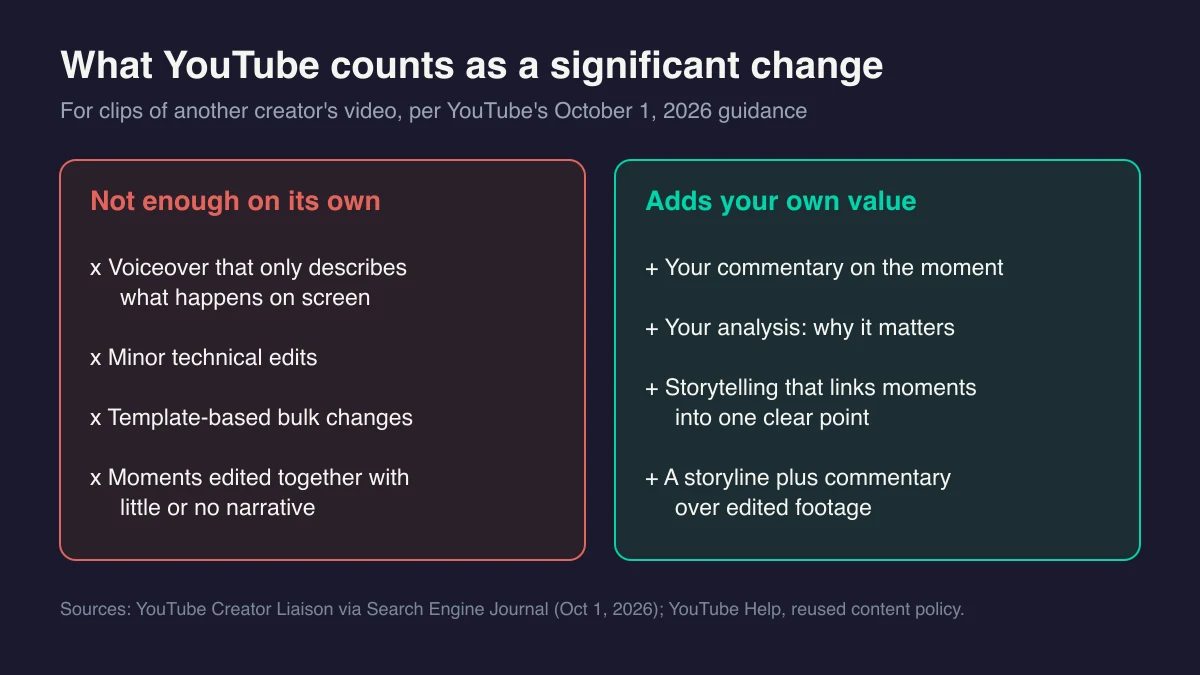
On October 1, 2026, YouTube went further. Search Engine Journal reported that YouTube will give original Shorts more priority and reduce the reach of channels that “mainly aggregate or re-upload other creators’ clips without significant changes.” Creator Liaison Rene Ritchie said remixes must add your own value. He named what does not count: “VO descriptions of what’s happening on screen, minor technical edits, or template-based bulk changes.” He pointed creators to commentary, analysis, and storytelling.
Channels that shift toward original content get their reach re-evaluated. YouTube gave no timeline and no tool to check whether your reach was cut.
What “significant changes” means for a clipper, in practice:
- Not enough: crop to vertical, add auto-captions, punch in on the speaker, drop in a template hook. That reads as minor technical edits or template-based bulk changes.
- Not enough: a voiceover that retells what the speaker just said.
- Closer: an opening line you write that frames why this moment matters, then your take after it.
- Closer: two or three moments cut into one argument, with your narration linking them.
- Closer: on-screen analysis, such as a claim checked against a source, a counterpoint, or context the episode left out.
Two more rules shape this. First, the word “mainly.” A YouTube channel made only of campaign clips fits the aggregator pattern, so mix in Shorts where your own commentary carries the video. Second, campaign requirements still decide approval. If a campaign forbids changes to the message, weigh that before you post it to YouTube. Low reach means low pay.
Other platforms set their own originality rules. The Creator Terms prohibit any clip that “violates the rules of the platform where the Clip is posted,” so check each one before you post. For the full YouTube picture, read the faceless guides to the reused content policy and the inauthentic content policy.
Step 7: Disclose That the Clip Is Paid
A campaign clip is paid promotion. Say so.
The Creator Terms make you “solely responsible” for FTC compliance, including “a clear and conspicuous disclosure placed at the beginning of the video.” Miss it and the clip can be rejected without pay.
The FTC’s Endorsement Guides count payment as a material connection and define clear and conspicuous as “difficult to miss.” When a clip makes its point with both picture and sound, the guides call for the disclosure in both. The FTC’s Disclosures 101 guide for influencers adds that the disclosure belongs in the video, not just the description, and accepts plain words like “ad” or “sponsored.”
On YouTube, also turn on the paid promotion setting in your video details. YouTube Help requires it when a video features sponsorships, endorsements, or other commercial relationships.
Step 8: Submit, Track, and Withdraw
Post the clip. Copy its public URL. Submit it to the campaign.
From there, per the Creator Terms:
- A fraud score screens it. The Bot Score runs from 0 to 100. A high score flags the clip for human review and pauses pay. A flag is not a rejection.
- The brand reviews it against its requirements and approves or rejects.
- Views count through your connected account. Pay accrues in rounds until the earning window ends.
- Settled pay lands in your balance. You withdraw through Whop.
Whop’s payout docs list a $10 minimum withdrawal where it applies. Standard payouts take up to 5 business days, and instant options are available.
Protect the account while you wait:
- Never buy engagement. The terms ban bought or generated views, likes, and followers, plus engagement pods. Buying or coordinating engagement means a permanent ban.
- Skip co-posting. Do not use Instagram Collab or similar features unless the campaign allows it. Split view counts can get the clip rejected.
- Appeal once, with evidence. You get one appeal per flagged submission. Content Rewards aims to answer within 10 business days.
Log every payout. Clipping income is usually taxable, so ask a tax professional where you live how to report it.
Step 9: Decide Whether Clipping Is Your Path or Your Training Ground
Clipping and running your own faceless channel are different businesses. Compare them before you commit your evenings.
| Whop clipping | Your own faceless channel | |
|---|---|---|
| Who owns the content | The brand, once approved, when it supplied the footage | You |
| Who pays you | Campaign budgets, per 1,000 verified views | YouTube ads after you join the Partner Program, plus anything you sell |
| Entry bar | Accounts, an editor, and campaign approval | Today: 1,000 subscribers plus 4,000 qualified public long-form watch hours in 12 months or 10 million qualified Shorts views in 90 days. From February 1, 2027, new applicants need 1,000 subscribers plus 8,000 qualified watch hours in 365 days or 20 million qualified Shorts views in 90 days; existing partners keep YPP entry and long-form monetization. |
| When pay stops | The budget runs out, the cap hits, or the earning window ends | When you stop publishing or lose monetization | | Main risk | Rejections, weak reach on reposted clips, rules you do not control | A long stretch of work before any pay |
See YouTube monetization requirements for details.
One smart use of clipping is paid practice. You learn hooks, pacing, and what holds attention in a swipe feed, and a campaign funds the lessons. If that pulls you toward your own channel, read how to start a faceless YouTube channel and the faceless short-form production system. For other private income models, browse the faceless business models hub.
Common Mistakes With Whop Clipping
1. Treating permission as originality
A campaign gives you the right to post. It does not make the clip original in YouTube’s eyes. Add commentary, analysis, or story, or expect weaker reach.
2. Chasing the highest rate
Rate is one of four numbers. A clip that misses the minimum earns nothing, the cap ends the upside, and an empty budget ends everything. Run the Step 2 math on every campaign.
3. Mass-producing template clips
Auto-clip tools and one template across dozens of clips are fast. They are also the “template-based bulk changes” YouTube named. Let AI find moments, then edit by hand. The Opus Clip review covers how auto-clippers pick moments and where manual control helps.
4. Skipping the disclosure
No disclosure at the start of the video can cost you the payout. It also puts you outside FTC rules.
5. Reusing campaign footage elsewhere
Your license covers the campaign clip only. Posting the same footage to your own compilation account steps outside it.
Frequently Asked Questions
Is Whop clipping legit?
The mechanics are documented. Whop’s help docs explain how brands fund campaigns and pay per 1,000 views after approval, and Content Rewards publishes Creator Terms with its 10% fee and payout holds. Legit does not mean easy money. Your pay depends on approval, real views, and a campaign budget that can run out.
Do you need followers to start clipping?
Whop’s docs and the Creator Terms set no follower minimum. You need accounts you control on a platform the campaign accepts, and you must be 18 or older. Some campaigns are application-only and pick their own creators. A brand-new account can earn if a clip gets views, but expect a slow start.
How much do clipping jobs pay?
Each campaign sets its own rate per 1,000 views, so there is no standard pay. Whop’s setup example uses $3 per 1,000 views. At that rate, a 10,000-view clip earns $30 before the 10% creator fee. Treat any income screenshot as one person’s result, not a forecast for you.
Can you clip and stay anonymous?
From the public, yes. You post on topic accounts and never show your face. From the platforms, no. Withdrawing through Whop requires a KYC check with ID, and Content Rewards screens creators against sanctions lists. Brands can also use your handle and voice to promote the clips you make.
Keep Reading
What to Do Next
Still deciding whether faceless YouTube fits you? Pick the next step that gives you direction, not a sales pitch.
Free spreadsheet
Compare 75 faceless niches side by side
Sort all 75 by CPM range, competition, and production difficulty. Filter to what fits you and pick one.
Free. No spam. Unsubscribe anytime.
Take the 2-min Quiz
Answer 10 questions, get matched to a channel model that fits your time, budget, and tone.
Start the Quiz