In this article
Instagram does not pay you per view.
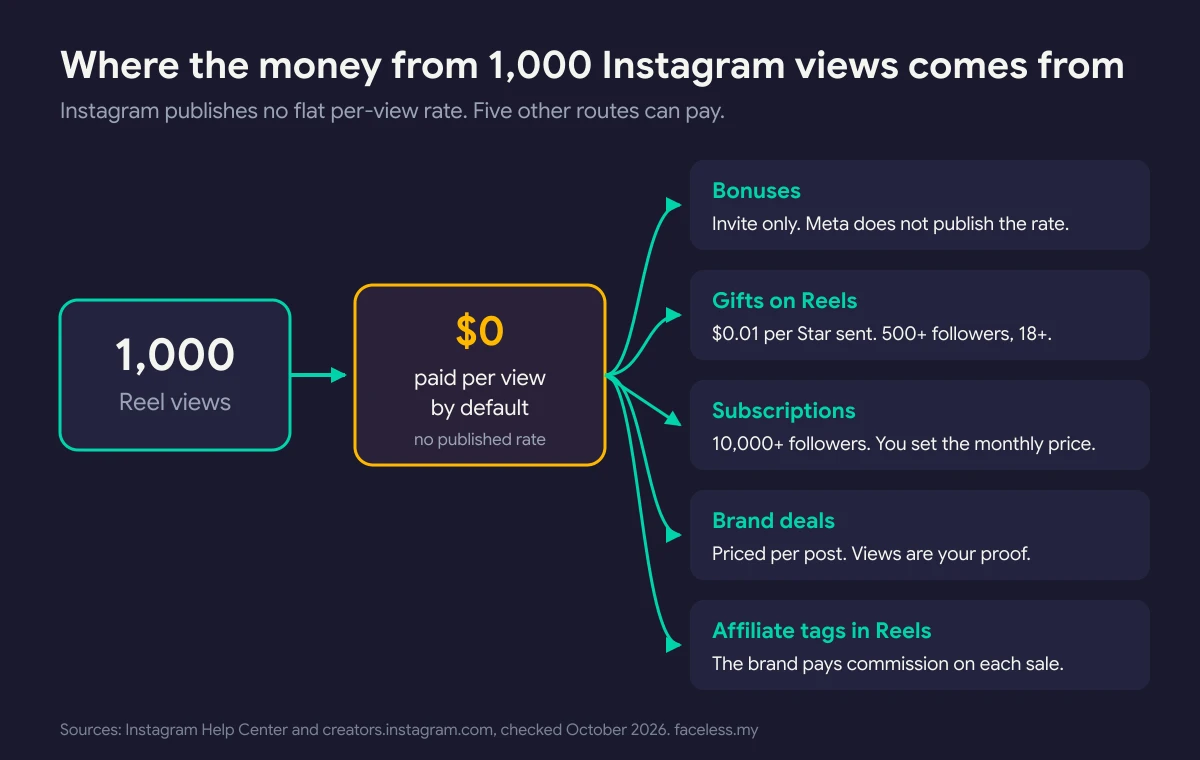
Meta publishes no rate per 1,000 views, and its creator earnings page lists no ad revenue share for Reels. Unless Instagram invites you into a bonus, views alone pay $0. The money comes from other places: Gifts, Subscriptions, brand deals, and affiliate tags in Reels. This guide shows which ones a faceless page can use, what each one pays per Meta’s own help pages, and how to work out what your views are really worth.
What You’ll Need
- A professional account (creator or business). Every Instagram earning tool in this guide requires one.
- Age 18 or older. Gifts, Subscriptions, Badges, and Creator Marketplace all set 18 as the minimum, per Instagram Help Center.
- A payout account. Gifts and Badges pay nothing until it is set up.
- An account in good standing. You must meet Instagram’s Partner Monetization Policies and follow the Community Standards.
- Your last 30 days of numbers from the Professional Dashboard: views, followers, and your top five Reels.
- A country where each tool is live. The rules below are for US creators. Availability differs by country and changes often.
Step 1: Know What Instagram Actually Pays For
Start by dropping the idea of a per-view rate. YouTube shares ad revenue and reports it as RPM, so a view there has a dollar value. (See how much faceless YouTube channels make for that math.) Instagram works differently.
Meta’s Instagram earnings page lists four tools that pay creators directly: Bonuses, Gifts, Subscriptions, and Badges. It adds two brand routes: partnership ads and Creator Marketplace. None of them is a flat rate per view.
Here is what each one pays for, using Meta’s own pages:
| Tool | What triggers the payment | Who qualifies (per Meta) | Published rate |
|---|---|---|---|
| Bonuses | Performance of your Reels and photo posts | Invite only, in test countries | Not published |
| Gifts | Stars viewers send on your Reels | 18+, 500+ followers, payout account | $0.01 per Star |
| Subscriptions | Followers paying monthly for extras | 18+, 10,000+ followers | You set the price |
| Badges | Viewers buying badges during Live | 18+, payout account | $0.99, $1.99, or $4.99 per badge |
| Creator Marketplace | Brand deals you negotiate | 18+, 1,000+ followers, public account | Set per deal |
| Affiliate tags in Reels | Sales from products you tag | Eligible creators in 5 launch countries | The brand’s commission |
Sources: Instagram Help Center pages for each tool and Meta’s shoppable Reels announcement, checked October 17, 2026.
So any per-view figure you see in a blog or video comes from creator screenshots or third-party estimates, not from Meta. Treat it as an anecdote.
Step 2: Check Which Tools Your Account Can Use
Open your Professional Dashboard. Look at the tools listed there. If Gifts or Subscriptions is missing, your account does not qualify yet, or the tool is not live in your country.
Then check the policy side. Instagram’s Partner Monetization Policies say you can only monetize content consumed by your “natural, authentic audience.” You also need “an authentic, established presence,” which includes “maintaining a sufficient follower base.” The same policy bans artificially boosting followers, views, or engagement to earn more.
This is where many faceless theme pages fail. A theme page that reposts other people’s clips has a reach problem before it has a money problem. Instagram’s own creator guidance says it is “less likely to recommend reposts of a reel that’s already on Instagram, content with noticeable watermarks, or accounts that regularly collect and reshare others’ content.”
Light edits do not fix this. Per Instagram Help, “simply stitching together clips or adding a watermark does not qualify as materially edited content.”
The fix: make the post yourself. Write the carousel, record the voiceover, build the faceless Reel from your own script. The faceless Instagram theme page guide covers formats that stay original without a face.
Step 3: Treat Bonuses as a Windfall, Not a Rate
Bonuses are the only Instagram tool that pays on how a post performs, not on what fans send or buy. That makes them the closest thing to “paid per view.” They are also the least reliable.
Per Instagram’s bonuses page, “bonuses are limited time and invite-only as we build toward a sustainable program.” The Help Center adds three conditions: a professional account, compliance with Partner Monetization Policies, and living “in an eligible country where we are testing bonuses.”
You cannot apply. Meta does not publish how the payout is calculated. And per the Help Center, your eligibility “may expire if you do not respond to the invitation by the end of the deal period.”
What to do:
- Check your notifications and Professional Dashboard each week for an invite.
- If one arrives, read its terms that day. Note the deal period and the payout rules.
- Accept before the deadline, then post on your normal schedule.
- Plan your income as if the bonus does not exist. If it pays, it is a bonus.
Step 4: Turn On Gifts and Do the Star Math
Gifts are the simplest native tool to understand. Viewers buy Stars and send them on your Reels. You keep a fixed cut per Star.
Per Instagram Help, creators receive “USD 0.01 for every Star received,” paid monthly. To qualify you need:
- A professional account
- Age 18 or older
- At least 500 followers
- A payout account
- Agreement to the Instagram Gifts Creators Terms
Per the same page, Gifts are live in about 50 countries, the US included. Collaborative posts and accounts that mainly post child-focused content cannot earn from Gifts.
Fees come out on the viewer’s side. Instagram takes a share when a viewer buys Stars, and Apple or Google takes a platform fee, “typically 30%,” per the same page. Your side stays at $0.01 per Star.
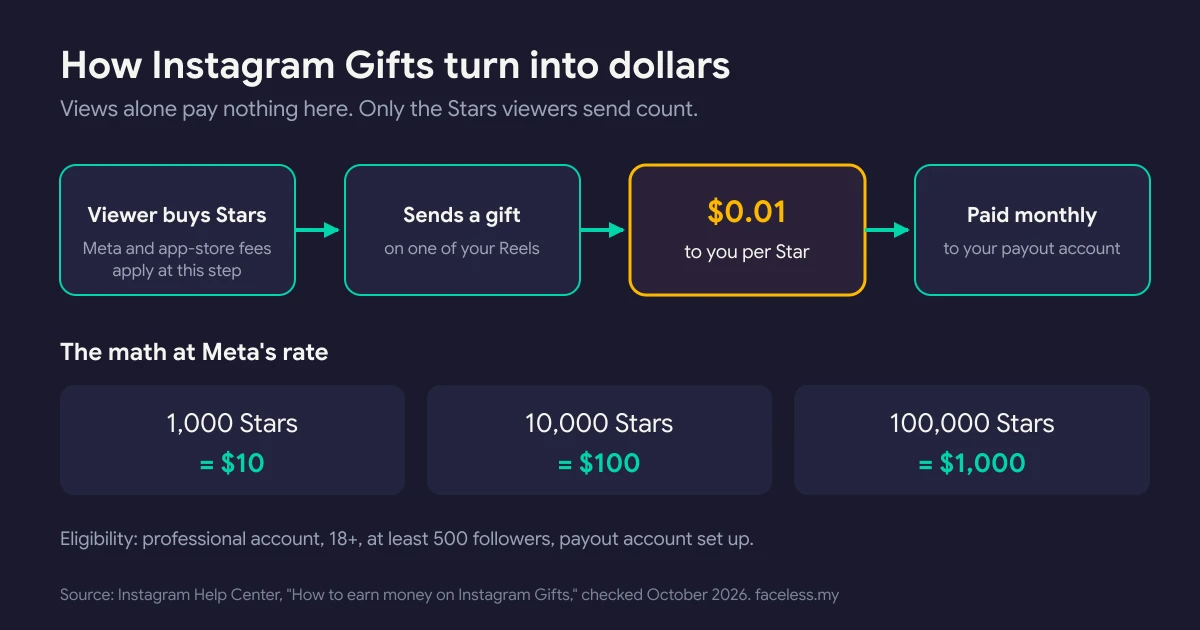
Notice what is missing from that math: views. Gifts pay on Stars sent, not on reach. Here is an illustration with made-up numbers. A Reel with 100,000 views and 500 Stars earns $5. A Reel with 5,000 views and 2,000 Stars earns $20. The smaller Reel wins because its audience cared enough to pay.
For faceless pages, that favors useful and warm content over broad viral clips. Track Gifts under Your tools, then Gifts, in the Professional Dashboard.
Step 5: Add Subscriptions or Live Badges Only If You Have Extras to Give
Subscriptions and Badges pay on fans, not views. Both need a reason for someone to pay.
Subscriptions. Per Instagram Help, you need to be 18 or older with “a professional account on Instagram with at least 10,000 followers.” You set the monthly price, and payouts land on the 21st of the following month, per Instagram’s creator site.
Fees are light on Instagram’s side. Its Subscriptions help page says Instagram currently takes no revenue share.
The app stores do take a cut. Per that same help page, “Google and Apple collect 30% in fees for in-app purchases.”
The faceless test: what would a subscriber get? An education page can offer subscriber-only templates, deep-dive carousels, or Q&A Lives. A quote or aesthetic page usually has nothing extra to sell.
Badges. Viewers buy badges during your Live videos in $0.99, $1.99, and $4.99 amounts, per Instagram’s Badges page. You get paid once you have earned at least $100. Faceless Lives can show hands-only demos or a desk-cam work session.
If neither fits your page, skip both. Spend the effort on Step 6 or Step 7.
Ready to choose what this audience should buy? OfferEngine.my owns offer selection and product monetization when the faceless format is no longer the main problem. Use the specialist route.
Step 6: Price Brand Deals on Audience, Not Views
Brand deals are priced per post or per package. Your views are proof of reach, not the price itself.
Instagram’s Creator Marketplace connects creators with brands. Per Instagram Help, you need at least 1,000 followers, a professional public account, and to be 18 or older. It is available wherever Meta advertising runs, except six listed regions. Brands can also pay to run your post as a partnership ad.
What do deals pay? There is no official rate card. Influencer Marketing Hub publishes planning benchmarks, last updated October 7, 2026:
| Follower tier | Typical rate per sponsored post (estimate) |
|---|---|
| Nano (under 10,000) | $10–$100+ |
| Micro (10,000–100,000) | $100–$500+ |
| Mid-tier (100,000–500,000) | $500–$5,000+ |
| Macro (500,000–1,000,000) | $5,000–$10,000+ |
| Mega (1,000,000+) | $10,000+ |
These are estimates from one research firm, not prices you will be offered. Niche, engagement, and usage rights move the number a lot. The same source puts influencer CPMs (what brands pay per 1,000 impressions on sponsored content) “frequently” between $5 and $25. That is the closest public figure to a per-1,000-views price, and it is paid by brands, not Instagram.
To get deals as a faceless page: pick a niche where brands sell something, keep a one-page media kit with your average views and saves, and list your business email in your bio. The faceless Instagram account types guide ranks which page styles attract sponsors.
Step 7: Tag Affiliate Products in Your Reels
This route opened in 2026, and it suits faceless product pages.
On March 24, 2026, Instagram announced shoppable Reels. Eligible creators can tag up to 30 products per Reel. You either search a brand’s Meta catalog or paste a single-product URL, including your own affiliate link. When a viewer buys, the brand pays your commission.
Key limits from Meta’s announcement:
- Rollout covers the US, Brazil, India, Indonesia, and Thailand first.
- Each tag must be a single product listed in a business’s Meta commerce catalog.
- Amazon and Shopee affiliate options are “coming to Instagram.”
A Meta spokesperson told Engadget that Meta is not taking a cut of these sales “for now.”

To use it: before you share a Reel, tap “Add product” in the share sheet, then tag or paste the product. Disclose it. Instagram’s branded content rules say content with an affiliate link should carry the “Paid partnership with” label.
For a deeper look at the model, read faceless affiliate marketing.
Step 8: Check Whether Facebook Pays for the Same Reels
If you want true performance pay from Meta, look at Facebook, not Instagram.
Per Meta’s newsroom, “Facebook Content Monetization pays creators based on the performance of their content.” Meta says Facebook paid creators “nearly $3 billion in 2025.”
The catch: Facebook’s program page says entry is currently by invitation.
There is also Creator Fast Track, announced March 2026 for established creators new to or returning to Facebook. Creators with at least 100,000 followers on Instagram, TikTok, or YouTube can earn $1,000 a month. Creators with over 1 million followers can earn $3,000 a month. Meta describes it as “three months of guaranteed pay for sharing eligible reels on Facebook.”
Originality rules apply there too. Meta’s March 2026 update says reposted content is deprioritized, and accounts that keep posting mostly unoriginal content may be demonetized. A repost theme page puts its earnings at risk on both apps.
Step 9: Work Out Your Own Earnings per 1,000 Views
Now build the only per-view number that matters: yours.
Pick a 30-day window. Add up every dollar your page earned in it: Gifts, any bonus, Subscriptions, Badges, deals, and affiliate commissions. Then use this formula:
Earnings per 1,000 views = total earnings ÷ (total views ÷ 1,000)
An illustration with made-up numbers: $40 in Gifts plus $120 in affiliate commissions on 200,000 views. That is $160 ÷ 200 = $0.80 per 1,000 views. This is arithmetic, not a benchmark.
Run it monthly. Then sort your top Reels by earnings, not views. The Reels that drove Stars, clicks, or deal inquiries tell you what to make next.
If your number sits near zero, the fix is rarely more views. It is a route from viewer to buyer. The how to monetize a faceless Instagram account guide maps those routes, from digital products to lead generation.
Common Mistakes
1. Quoting someone else’s per-view rate
Bonus payouts are invite only and Meta does not publish the formula. A screenshot of one creator’s bonus tells you nothing about your page. Use your own Step 9 number.
2. Reposting viral clips and expecting to get paid
Reposts and watermarked clips are less likely to be recommended, and stitching clips together does not count as original. Make your own carousels and voiceover Reels.
3. Chasing views in a niche with no buyers
A meme page can pull big reach and still earn little, because Gifts, deals, and affiliate sales all need an audience that spends. Compare options in the best faceless Instagram niches ranking.
4. Skipping the disclosure label
Affiliate and sponsored Reels need the “Paid partnership with” label. Skipping it breaks Instagram’s branded content rules, and every earning tool depends on an account in good standing.
5. Leaving the payout account for later
Gifts and Badges pay nothing until a payout account exists. Set it up the day you qualify.
Frequently Asked Questions
How much does Instagram pay for 1 million views?
Nothing by default. Instagram publishes no per-view rate, so 1 million views earn $0 unless you hold a bonus invite. What those views can earn comes from Gifts at $0.01 per Star, brand deals, or affiliate sales. A million views with no Stars and no offer still pays nothing.
Does Instagram pay per view in the US?
Not as a standard rate. US creators can earn from Gifts, Subscriptions, Badges, brand deals, and affiliate tags in Reels. Bonuses pay on performance but are invite only and limited in time. Facebook’s Content Monetization program pays on performance, but entry is by invitation.
How many followers do you need to get paid on Instagram?
It depends on the tool. Per Instagram Help, Gifts need 500 followers, Creator Marketplace needs 1,000, and Subscriptions need 10,000. The Badges help page lists no follower minimum. All of them require a professional account and age 18 or older.
Can I apply for an Instagram Reels bonus?
No. Instagram’s bonus page describes bonuses as “limited time and invite-only.” You cannot apply, and Meta does not publish the payout formula. Plan income around Gifts, deals, and affiliate sales, and treat any bonus invite as extra.
Keep Reading
What to Do Next
Three-way fork by channel state. Pre-traction (no channel or zero views)? Start with channel choice. Faceless channel with traction? Stack revenue paths by niche. Building a digital product to sell? Different workflow entirely.
Free spreadsheet
Compare 75 faceless niches side by side
Sort all 75 by CPM range, competition, and production difficulty. Filter to what fits you and pick one.
Free. No spam. Unsubscribe anytime.
Selling products? Go to OfferEngine
If the real question is which digital product to build, price, and position, OfferEngine.my owns the offer-architecture workflow. Anonymity does not change product design.
Open OfferEngine.my →Faceless with traction · Channel Launch Pack
If anonymity stays central and you want to scale a faceless channel into reliable revenue, the Channel Launch Pack covers 10 cloneable channels with topic supply for AdSense plus affiliate paths.
$9 $19 53% off Lowered for first-time creators.