In this article
Higgsfield sells credits, not clips. That changes the maths.
It is an AI creative suite that bundles video and image models, plus a “Content Factory” that turns one idea into a finished faceless video. This review covers the plans, how fast credits drain, how it compares with Kling, what Content Factory costs per video, and what the terms say about using the output on a monetized channel.
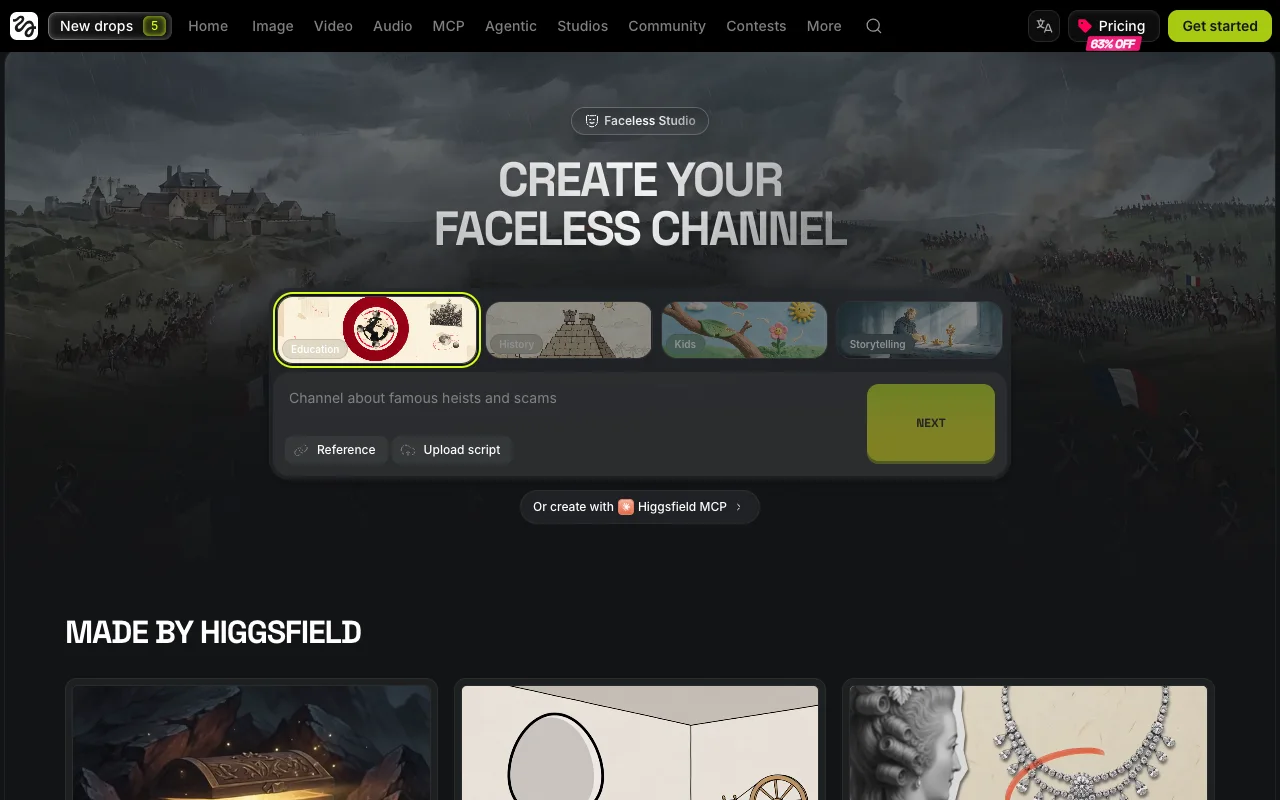
Screenshot of Higgsfield’s Faceless Studio page, taken 22 November 2026.
What Is Higgsfield and How Does It Work?
Higgsfield is an AI creative suite that gives one subscription access to many video and image models, including Seedance 2.5, Kling 3.0 and 4.0, Veo 3.1 and Wan 2.6, per its own site navigation. You pay in credits, and each generation costs more or fewer credits depending on the model, clip length and resolution.
Most AI video tools run one model. Higgsfield works more like a hub: you pick a model inside one account and spend from one credit balance. The catch is the credit meter.
Two workflow tools matter to faceless creators:
- Faceless Studio. You type a channel idea or upload a script, pick a preset (Education, History, Kids or Storytelling), and Higgsfield builds from there.
- Content Factory. One “What if…” question in, one finished short video out.
This review leans on Higgsfield’s published pricing and terms for hard numbers, and on community threads for the complaints. For the wider field, see the best AI text-to-video tools for faceless channels.
How Much Does Higgsfield Cost?
Higgsfield’s individual plans are Free ($0), Starter ($15 a month, 200 credits), Plus ($49 a month, 1,000 credits) and Ultra ($129 a month, 3,000 credits), per Higgsfield’s October 2026 pricing guide. Plus and Ultra unlock every model. Team plans start at $79 per seat for 1,000 credits per seat.
Here is the full plan table, taken from Higgsfield’s pricing explainer (published 24 October 2026) and checked against the live pricing page on 22 November 2026.
| Plan | Price | Credits per month | Models | Video jobs at once |
|---|---|---|---|---|
| Free | $0 | None included | Limited set | 1 |
| Starter | $15/month | 200 | Selected models | 2 |
| Plus | $49/month | 1,000 | Every model | 6 |
| Ultra | $129/month | 3,000 | Every model | 8 |
| Team | $79 per seat/month | 1,000 per seat | 2 to 9 members | n/a |
| Scale | $215 per seat/month | 2,500 per seat | 5 to 15 members | n/a |
Starter has no watermark but only opens selected models. Seedance 2.5, Veo and Kling 3.0 at 1080p need Plus or Ultra. The free plan can put a visible Higgsfield watermark on outputs; paid plans do not.
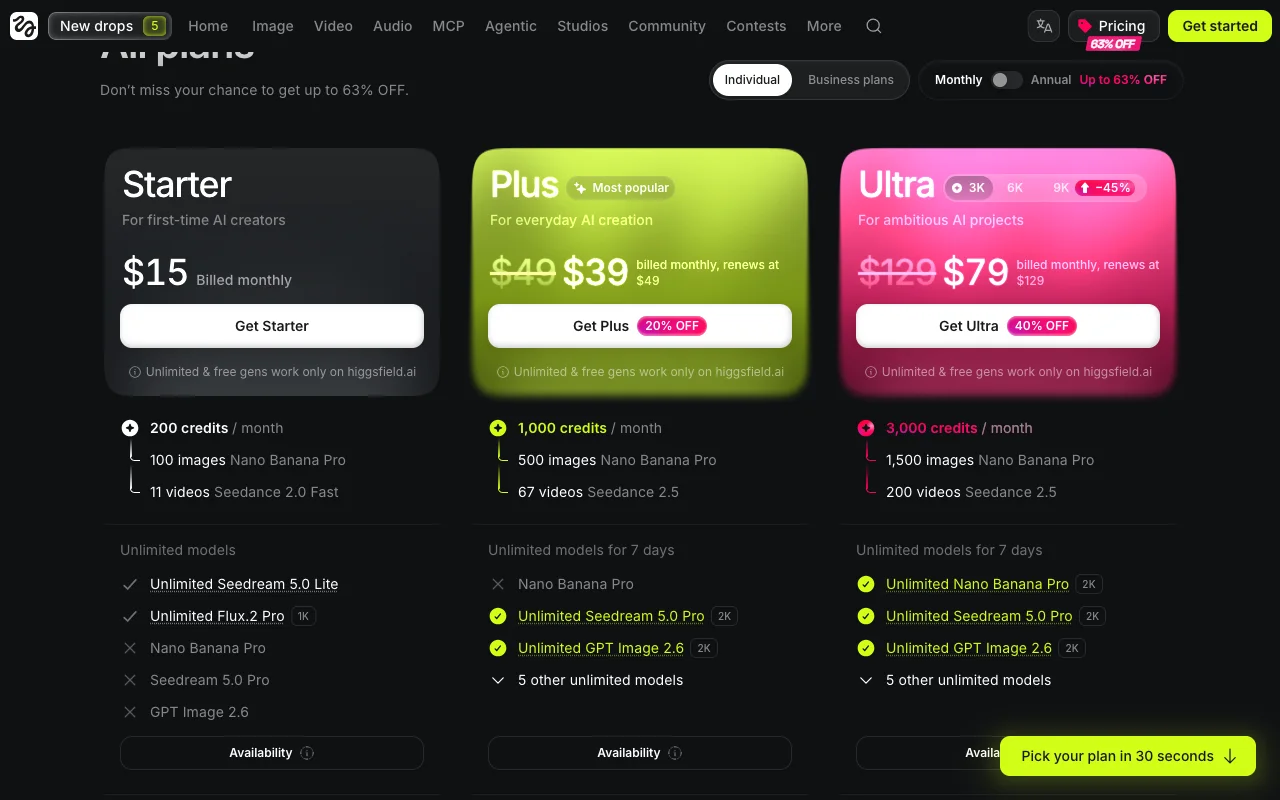
Screenshot of the Higgsfield pricing page in monthly view, 22 November 2026. A Black Friday promotion was running, so Plus and Ultra showed discounted first months that renew at $49 and $129.
Budget for the renewal price, not the headline. Higgsfield’s terms say a promotional price converts to the then-current standard price unless you cancel first (Terms of Use, section 10.7, last updated 23 October 2026).
Does this sound like your budget? Before you pay for any AI video plan, run the free Tool Stack Calculator. It matches a lean setup to your budget, niche and publishing pace. Free calculator and plan.
How Fast Do Higgsfield Credits Run Out?
On the Plus plan, 1,000 credits cover about 28 five-second Seedance 2.5 clips at 720p, or 12 at 1080p, if every generation is a keeper, per Higgsfield’s pricing guide. A 5-second 720p Seedance 2.5 clip costs 35 credits, about $1.72, and three attempts at it cost about $5.15.
| Model and setting | Credits | Approx. cost on Plus |
|---|---|---|
| Seedance 2.0, 5s, 720p | 30 | about $1.47 |
| Seedance 2.0, 5s, 4K | 130 | about $6.37 |
| Seedance 2.5, 5s, 720p | 35 | about $1.72 |
| Seedance 2.5, 5s, 1080p | 80 | about $3.92 |
| Seedance 2.5, 30s, 720p | 210 | about $10.29 |
Credit counts are Higgsfield’s. The dollar column is our arithmetic at roughly $0.049 per credit on Plus.
Three rules matter more than the table:
- Completed generations are charged. If a clip finishes and you hate it, the credits are gone. Failed ones are usually refunded.
- Monthly credits do not roll over. Terms section 9.4 says unused subscription credits expire at the end of the billing period.
- “Unlimited” has fair-use limits. Section 10.6 says unlimited models run on a separate queue that may be slowed or throttled.
Community feedback matches this. In a 15 November 2026 r/generativeAI thread, one user called a multi-hour 720p “unlimited” queue unusable for deadlines, and another said a 6,000-credit monthly quota can vanish in two or three days of Seedance video work. Those are individual users, not a measured average.
The pricing page shows 67 Seedance 2.5 videos on Plus, against the blog’s 28 clips, because cost changes with settings. Check the per-generation cost in the app first.
How Does Higgsfield Compare With Kling?
Kling is a single model family from Kuaishou, with a free tier that refills about 66 credits a day and paid plans from $10 a month (Standard, 660 credits) to $37 (Pro, 3,000 credits), per pricing trackers. Higgsfield is a multi-model hub that hosts Kling 3.0 and 4.0 alongside other models, at a higher price per clip.
These two are not strict rivals. Higgsfield lists Kling 3.0 and 4.0 among its video models, so you can reach Kling through a Higgsfield account. The question is whether you want the hub or the model.
| Kling direct | Higgsfield | |
|---|---|---|
| What it is | One model family | Many models in one account |
| Free tier | About 66 credits a day (per CloudZero, October 2026) | Free plan, no monthly credits, watermark possible |
| Entry paid plan | Standard, $10/month, 660 credits | Starter, $15/month, 200 credits |
| Mid plan | Pro, $37/month, 3,000 credits | Plus, $49/month, 1,000 credits |
| Workflow tools | Generation only | Faceless Studio, Content Factory, MCP |
Credits are not the same unit, so compare cost per clip. Kling costs roughly 6 credits a second at 720p without audio, per eesel.ai. A 5-second clip is about 30 credits, or about $0.37 at Pro’s $37 for 3,000 credits. A 5-second Seedance 2.5 clip at 720p on Higgsfield Plus is about $1.72.
By that arithmetic Higgsfield costs four to five times more per short clip. The models differ, so this is a price comparison, not a quality verdict. We have no data on what Kling 3.0 costs in Higgsfield credits, so check the app. For Kling’s own plans and weak spots, see our Kling AI review. For a third option, see the Runway AI review.
Pick Kling direct if you mainly want Kling output and cost per clip matters most. Pick Higgsfield if you want several models in one place, or the Faceless Studio and Content Factory workflow.
What Is Higgsfield Content Factory and What Does It Cost?
Content Factory is a Higgsfield tool that turns one “What if…” question into a finished faceless video, with script, characters, voiceover and edit generated for you. Videos run 15 seconds to 5 minutes, and a one-minute episode costs 63 credits, about $3.15 on Plus, per Higgsfield’s announcement.
Higgsfield announced Content Factory in October 2026 (22 October in search listings, 23 October on the page). Per Higgsfield’s announcement:
- You enter a “What if…” topic, such as a day without gravity.
- Higgsfield writes the script, picks characters, generates scenes and voiceover, and edits the video.
- You choose one to four episodes per generation and pick from 50-plus presets.
- A TikTok or Instagram link can serve as a format reference. Higgsfield says it is designed not to copy the reference’s words, story or characters.
- It runs on higgsfield.ai, in Claude through Higgsfield MCP, and in Supercomputer.
Screenshot of Higgsfield’s Content Factory announcement post, 22 November 2026.
Higgsfield’s cost table:
| Video length | 1 episode | 4 episodes |
|---|---|---|
| 15 seconds | 15.75 credits ($0.79) | 63 credits ($3.15) |
| 1 minute | 63 credits ($3.15) | 252 credits ($12.60) |
| 5 minutes | 315 credits ($15.75) | 1,260 credits ($63.00) |
Dollar figures are Higgsfield’s estimates on the Plus plan, at about $0.05 per credit.
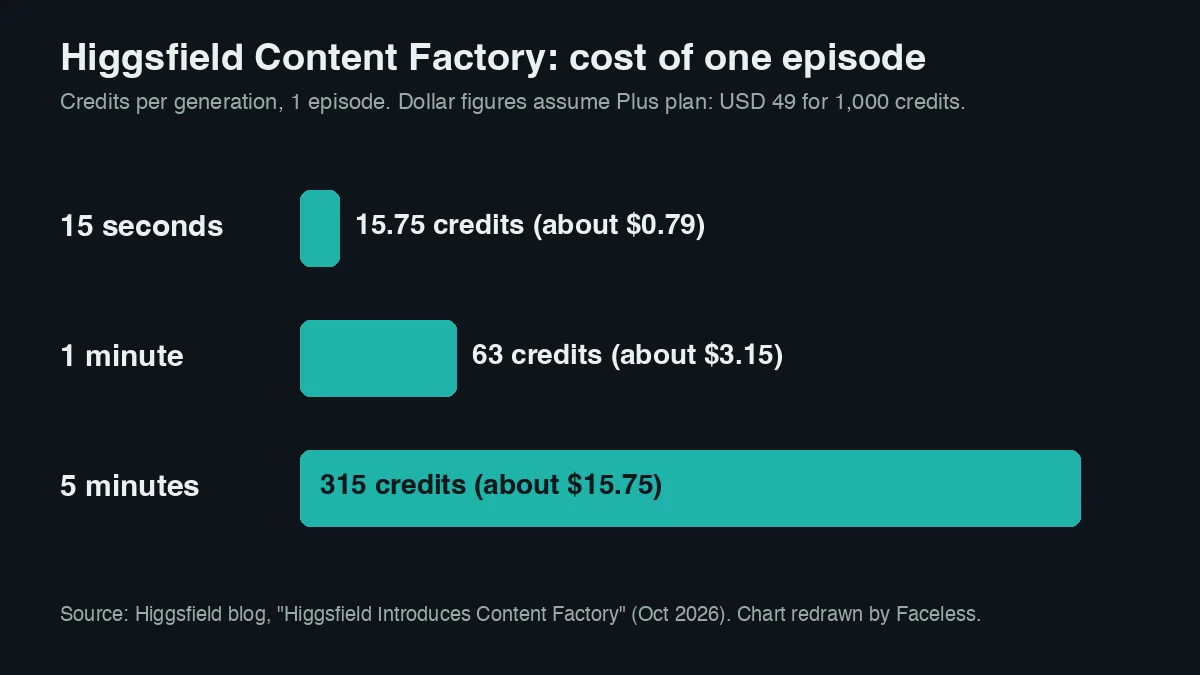
Original chart built from the figures in Higgsfield’s Content Factory announcement.
Two limits apply. Higgsfield says the Claude version makes vertical 9:16 videos, and the announcement does not state the export format for the website version, so confirm it before planning a 16:9 channel. And Higgsfield’s own tips say to check every factual claim in the narration. Treat the script as a draft.
Content Factory fits Shorts-style “What if” content. It is a weak match for a researched 8-minute documentary.
Can You Use Higgsfield Videos on a Monetized YouTube Channel?
Higgsfield’s Terms of Use say it does not claim ownership of your outputs or restrict their commercial use, and that your rights in exported outputs survive cancellation (section 4.4, updated 23 October 2026). Paid plans include commercial use. The bigger risk is YouTube’s inauthentic content rule, which targets mass-produced, repetitive videos.
Rights first. The terms say Higgsfield does not claim ownership of your inputs or outputs, and you may transfer or sublicense outputs to clients. Paid plans include commercial use per its pricing guide. Skip the free plan for anything you publish, since it can carry a watermark.
Three catches in the same terms:
- Training. Higgsfield may use your content, inputs and outputs to train its models. Enterprise customers get different terms.
- Provenance marks. Higgsfield may embed C2PA-style metadata, and you must not remove it (sections 6.4 and 5.5).
- Disclosure. Where the law requires it, you must disclose that output is AI-generated.
This is a read of published terms, not legal advice.
Then the platform. YouTube’s monetization policies say monetized content must be original and authentic, not mass-produced, generic or repetitive. YouTube also asks creators to disclose realistic altered or synthetic content.
A one-click “factory” is exactly the workflow that produces identical-looking videos at volume. Add your own scripts, angle and edit. Our guide to YouTube demonetization explains how reviewers read a channel.
Pros and Cons
Higgsfield’s strengths are one account for many models, a Faceless Studio and Content Factory workflow, and a clear commercial-use statement in its terms. Its weaknesses are credit drain from retries, monthly credits that do not roll over, and mixed community feedback on queues and value.
Pros:
- Many models, one balance. Seedance, Kling, Veo and Wan behind one login.
- Built for faceless formats. Faceless Studio and Content Factory target camera-off channels.
- Clear output rights. No ownership claim and no limit on commercial use of outputs.
- Published credit costs. Per-model credits and a retry table are public.
Cons:
- Expensive per clip. About $1.72 for a 5-second 720p Seedance 2.5 clip on Plus.
- No rollover. Light months waste what you paid for.
- Retries cost full price. Finished generations are charged even when unusable.
- “Unlimited” is queue-limited. Fair-use limits and slower queues apply.
- Mixed community sentiment. The r/generativeAI thread above includes users who say orchestration layers like Higgsfield burn credits fast. That is opinion, not a rating.
Who Is Higgsfield For?
Higgsfield suits faceless creators who already publish, need several video models in one account, and can afford about $49 a month for 1,000 credits plus retries. It is a poor first purchase for someone with no finished video yet, because a free or low-cost tool proves the workflow first.
This site is built around one goal: get video one out on the smallest stack that works. Against that goal, Higgsfield is a second-stage tool.
It fits you if:
- You publish Shorts or short explainers weekly and want “What if” content without writing every script.
- You want Seedance, Kling and Veo without three accounts, and can budget for retries.
It does not fit you if:
- You have not published a video yet. Start with a free tool and a script. The Tool Stack Calculator and how to start a faceless YouTube channel are the cheaper way to decide.
- Your format is long, researched narration. Pair a voice tool such as ElevenLabs with a lean editor instead.
- Cost per clip is your main constraint. Kling direct is cheaper per short clip by the arithmetic above.
If you start, take one month of Starter or Plus and cap credits per video.
Frequently Asked Questions
Is Higgsfield Worth It for Faceless YouTube Channels?
Once you publish regularly and need several models, yes. Plus costs $49 a month for 1,000 credits, about 28 five-second Seedance 2.5 clips at 720p with no retries, per Higgsfield. For a first video, a cheaper tool proves your workflow first.
How Much Does Higgsfield Cost per Month?
Individual plans are Free, Starter at $15, Plus at $49 and Ultra at $129 a month, with 200, 1,000 and 3,000 monthly credits on the paid tiers, per Higgsfield’s October 2026 pricing guide. Promotions renew at the standard price.
Does Higgsfield Let You Use Videos Commercially?
Yes, per its terms. Higgsfield does not claim ownership of your outputs or restrict commercial use, and your rights in exported outputs survive cancellation (section 4.4, updated 23 October 2026). The free plan can add a watermark, and YouTube’s monetization rules still apply.
Is Higgsfield Better Than Kling?
Not on price per clip. Our arithmetic puts a 5-second 720p Kling clip near $0.37 on the $37 Pro plan, against about $1.72 for Seedance 2.5 on Higgsfield Plus. Higgsfield wins on model choice and workflow tools. The models differ, so this is cost, not quality.
What Is Higgsfield Content Factory?
Content Factory turns one “What if…” idea into a finished faceless video, 15 seconds to 5 minutes long, with one to four episodes per generation. A one-minute episode costs 63 credits, about $3.15 on Plus, per Higgsfield’s October 2026 announcement.
Keep Reading
What to Do Next
Don't pay for a stack you don't need yet. Start with the cheapest workable setup.
Get the Tool Stack Plan
3 tiers ($0, $30, $100), 12 tools, upgrade triggers per tier. Decide once, stop hopping. Free PDF.
Free. No spam. Unsubscribe anytime.
Browse the Tools Hub
Free YouTube tools: name generator, title generator, money calculator, thumbnail preview. No signup.
Open Tools HubComplete Channel Launch Pack
10 channel blueprints plus setup assets so you can spend less time choosing tools and more time shipping.
$9 $19 53% off Lowered for first-time creators.