
In this article
YouTube does not pay a fixed rate per view.
It shares ad revenue with creators in the YouTube Partner Program. Published creator data puts long-form pay at roughly $2 to $8 per 1,000 views, per vidIQ. That is $0.002 to $0.008 per view, or about $2,000 to $8,000 per 1 million views. Shorts pay far less: well under a tenth of a cent per view.
Your exact rate is your RPM in YouTube Studio, divided by 1,000. The numbers in this guide are estimates from public data, not a forecast for your channel. The steps below show how to find your own rate and what moves it.
What You’ll Need
- YouTube Studio access. Revenue numbers only appear after your channel joins the YouTube Partner Program (YPP).
- Your last 90 days of analytics, with long-form videos and Shorts read separately.
- Your top viewer countries from the Audience tab in Studio Analytics.
- Your niche, named plainly: finance, history, motivation, gaming, and so on.
- A calculator or spreadsheet. The core formula is one division.
Step 1: Confirm Your Channel Earns From Views at All
Views pay nothing until you join YPP and turn on ad revenue sharing.
Today, ad revenue sharing needs 1,000 subscribers plus either 4,000 qualified watch hours in the last 12 months or 10 million qualified Shorts views in the last 90 days, per YouTube Help. Watch hours from the Shorts feed do not count toward the 4,000 hours.
The bar is moving. On August 10, 2026, YouTube announced that from February 1, 2027, new applicants will need 8,000 qualified watch hours in the last 365 days or 20 million qualified Shorts views in the last 90 days (YouTube Official Blog). The new entry bar does not affect channels already in YPP. Separately, from February 1, 2027, Shorts ad and subscription revenue sharing requires 10 million qualified Shorts views in the last 90 days, including for existing partners. Channels below that line keep earning on long-form, and Shorts sharing resumes when they cross it again. Earlier fan-funding and shopping thresholds stay the same. See YouTube monetization requirements for details.
Not there yet? The free YouTube Monetization Checker shows which threshold you are closest to. Per-view math only matters once you cross one.
Step 2: Separate CPM From RPM
Most “YouTube pays $X per view” claims quote the wrong number.
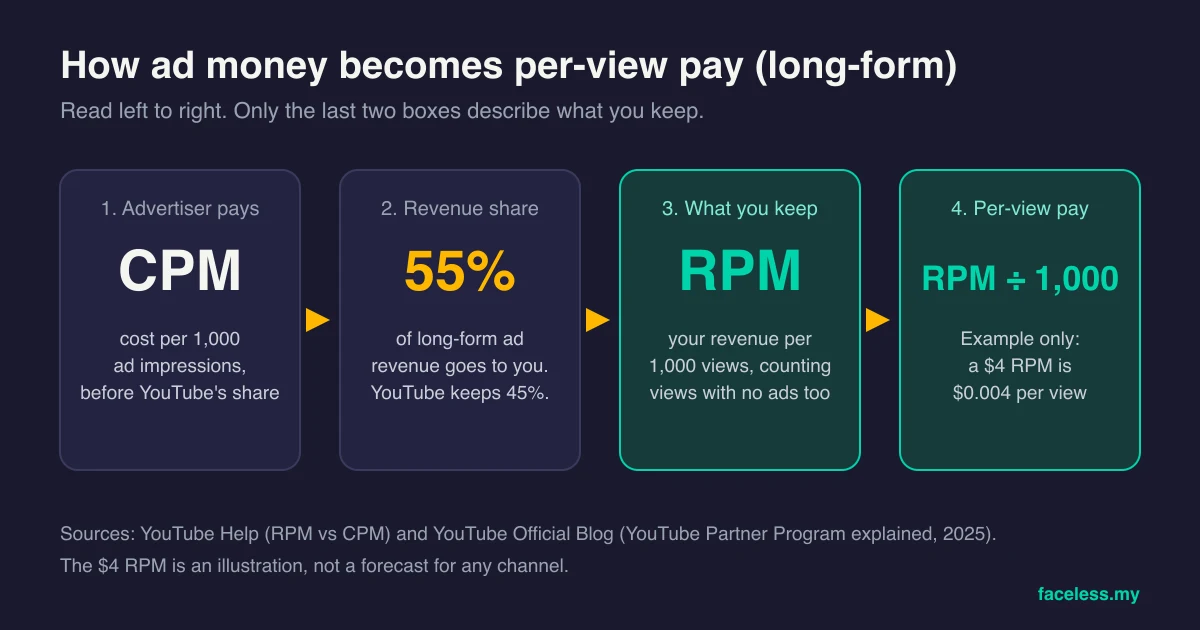
CPM is what advertisers pay per 1,000 ad impressions, before YouTube takes its share. RPM is your total revenue per 1,000 views, after YouTube’s share, per YouTube Help. RPM counts views that showed no ad. It also includes channel memberships, YouTube Premium, Super Chat, and Super Stickers.
That makes RPM the honest per-view number. CPM only covers monetized views, so it always looks bigger. YouTube’s own help page notes that playback-based CPM is often higher than CPM, too.
On long-form videos, creators keep 55% of ad revenue and YouTube keeps 45% (YouTube Official Blog). So any CPM you read online is nearly double what reaches you per ad view. Then views with no ad pull your real rate lower still.
Want CPM benchmarks by topic? They live in the YouTube CPM by niche breakdown. Just remember those are advertiser prices, not your pay.
Step 3: Find Your RPM in YouTube Studio
Your RPM is already calculated. You only need to read the right version of it.
- Open YouTube Studio and select Analytics.
- Open the Revenue tab. It shows estimated revenue, RPM, and your revenue sources.
- Set the date range to the last 90 days. A single week can swing hard.
- Check the revenue sources report. It shows how much came from watch page ads versus Shorts feed ads.
- Open the analytics for a few long-form videos and a few Shorts, one at a time. Each has its own Revenue tab with its own RPM.
Read the per-format numbers, not just the channel total. A channel-wide RPM blends Shorts and long-form. If you post both, that blended number describes neither.
Step 4: Turn RPM Into a Per-View Rate
Divide RPM by 1,000. That is the whole formula.
These RPMs are examples to show the math, not targets:
- $2 RPM = $0.002 per view (a fifth of a cent)
- $5 RPM = $0.005 per view (half a cent)
- $10 RPM = $0.01 per view (one cent)
- $25 RPM = $0.025 per view (two and a half cents)

Seen per view, the money looks tiny. That is normal. Ad revenue is a volume business. It only adds up across thousands of views a day, which is why the next steps matter more than the formula.
Step 5: Count the Views That Actually Pay
Not every view on your counter earns.
Since August 24, 2026, YouTube counts a view the moment a video starts to play, across Shorts, long-form, and live streams (YouTube Help). YouTube says this change does not touch Partner Program earnings. Those are still based on engaged views and engaged watch hours.
So your public view count now runs ahead of the views that pay. Divide a month’s revenue by that public counter and you get a per-view rate lower than your real one. Use the RPM in Studio instead.
These views earn little or nothing:
- Views where no ad ran (RPM already counts these, which is why RPM sits below CPM)
- Shorts views from before you accepted the Shorts Monetization Module
- Shorts that break advertiser-friendly guidelines
- Artificial views, such as bot traffic
- Non-original Shorts, such as unedited clips or compilations with nothing added
The last four come from YouTube’s Shorts monetization policies. The last one hits faceless channels hardest. Lightly edited clips can pull views that never enter the payout pool. Read the reused content policy guide before you build a Shorts plan on other people’s footage.
Step 6: Split Shorts From Long-Form
Shorts and long-form get paid through different systems.
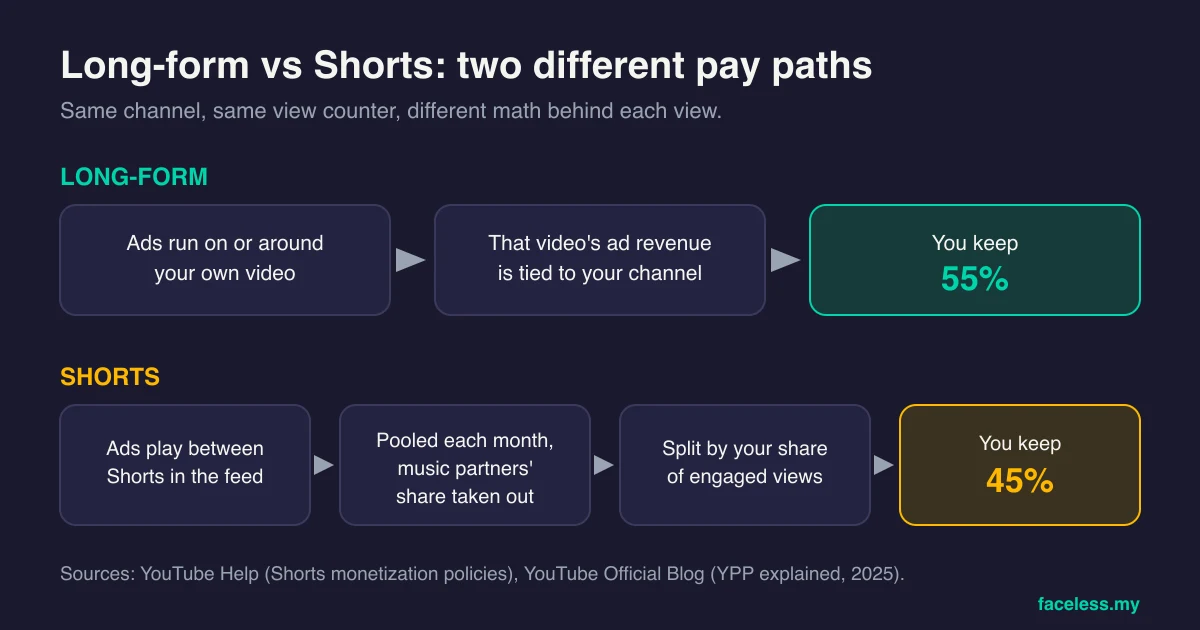
Long-form ads run on your own video. You keep 55% of that ad revenue.
Shorts ads play between videos in the Shorts feed. YouTube pools that money each month, takes out the share owed to music partners, then splits the rest by each creator’s share of engaged views. Creators keep 45% of their allocation, whether or not they used music (YouTube Help).
The result is a big gap per view. Long-form creators who shared their numbers with Business Insider in 2023 reported RPMs from $1.61 to $29.30. Shorts creators reported $0.04 to $0.06. One Shorts creator made $383.13 in a month from 7 million Shorts views.
That works out to about $0.00005 per Short view. Even the lowest long-form RPM in that group pays roughly 30 times more per view.
Shorts still earn their place. They build reach and subscribers cheaply. Use them to feed long-form, not as the main pay source. The faceless YouTube Shorts guide covers that workflow. And a longer Short does not pay more by itself, as the best length for YouTube Shorts breakdown explains.
Ready to choose what this audience should buy? OfferEngine.my owns offer selection and product monetization when the faceless format is no longer the main problem. Use the specialist route.
Step 7: Adjust for Your Faceless Niche
Niche moves per-view pay more than anything else you control.
Advertisers pay more to reach viewers who are about to spend. A viewer comparing credit cards is worth more to a bank than a viewer watching a game clip is worth to a snack brand. Your face plays no part in that. A faceless finance explainer earns like finance. A faceless gaming channel earns like gaming.
Here is what Faceless editorial RPM estimates, based on publicly reported creator data, look like per view:
- Finance: $10 to $25 RPM, or 1 to 2.5 cents per view
- History: $5 to $15 RPM, or 0.5 to 1.5 cents per view
- Motivation: $3 to $8 RPM, or 0.3 to 0.8 cents per view
- Gaming: $2 to $8 RPM, or 0.2 to 0.8 cents per view
Business Insider’s reporting shows the same effect inside one channel. A personal finance creator’s RPM rose from around $6 to $29.30 over about a year as he made more personal finance videos.
There is a catch. High-RPM niches need more research per video, tighter accuracy, and more trust before viewers stay. A lower-RPM niche you can publish twice a week can out-earn a finance channel you abandon after ten uploads.
For monthly revenue by niche and view level, see how much faceless YouTube channels make. To test your own niche and view numbers, use the YouTube Money Calculator.
Step 8: Adjust for Where Your Viewers Live
The same view pays differently by country.
AIR Media-Tech published 2025 Shorts RPM averages by country, drawn from channels in its network: about $0.33 in the United States, $0.17 in the United Kingdom and Canada, and $0.008 in India. In that dataset, a US Shorts view is worth about 40 times an Indian one. Treat it as one company’s data, not a YouTube figure.
Long-form follows the same pattern. Advertisers bid more for viewers in high-spending markets, so your RPM tracks your audience mix.
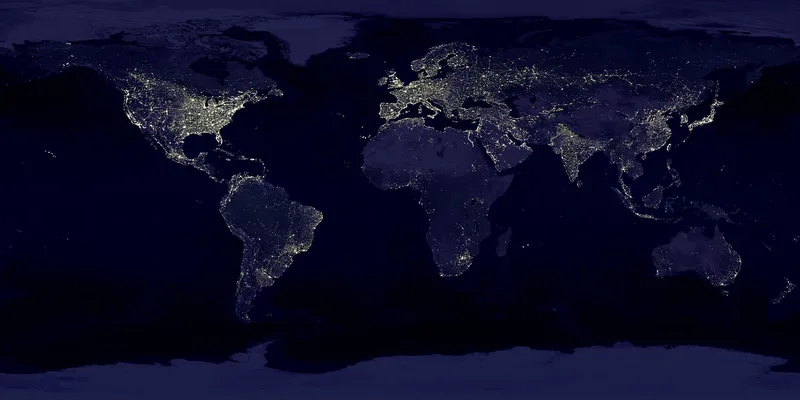
Check your top geographies in the Audience tab of Studio Analytics. If most viewers sit in lower-RPM countries, published averages will overstate your per-view pay. A channel in English with mostly US viewers will usually sit higher.
Step 9: Run the Math for 1,000, 100,000, and 1 Million Views
Now put it together. Multiply your views by your RPM, then divide by 1,000.
Until you have your own RPM, these published ranges give a starting estimate:
| Views | Long-form ($2 to $8 RPM) | Shorts ($0.04 to $0.06 RPM) | Shorts, US viewers (about $0.33 RPM) |
|---|---|---|---|
| 1,000 | $2 to $8 | $0.04 to $0.06 | about $0.33 |
| 100,000 | $200 to $800 | $4 to $6 | about $33 |
| 1,000,000 | $2,000 to $8,000 | $40 to $60 | about $330 |
Sources: the long-form range is vidIQ’s typical RPM range. The Shorts ranges come from creators who reported to Business Insider and AIR Media-Tech’s 2025 US average. All are estimates. Your Studio RPM replaces them.

What each level means in practice:
- 1,000 views pays a few dollars on long-form and a few cents on Shorts. At this stage, the views matter for learning, not income.
- 100,000 views on long-form lands around $200 to $800 at typical RPMs. In finance, the same views could pay far more. On Shorts, expect tens of dollars at most.
- 1 million views on long-form lands around $2,000 to $8,000 at typical RPMs. On Shorts, the same views pay roughly $40 to $330.
One real data point helps: vidIQ reported $3,231.42 in ad revenue from 1,035,307 views on its own channel. That sits inside the long-form range above.
Ad revenue is also only one income line. Sponsors, affiliates, and products often pay more per viewer than ads do. The faceless monetization guide covers the order to add them in.
Common Mistakes When Estimating YouTube Pay Per View
These errors make per-view estimates look better or worse than they are.
1. Quoting CPM as your pay
CPM is the advertiser’s price before YouTube’s share, and it ignores views with no ad. Use RPM. It is the number that matches your payout.
2. Dividing revenue by the public view counter
Since August 24, 2026, the public counter includes every view that starts to play. Earnings still use engaged views. Divide by the counter and your per-view rate looks lower than it is.
3. Blending Shorts and long-form
A channel-wide RPM mixes two pay systems with a gap of roughly 30 times per view. Read each format on its own before you plan around either.
4. Picking a niche on RPM alone
A high-RPM niche you cannot research every week earns less than a mid-RPM niche you publish in for a year. Pick the niche you can sustain, then grow RPM with better topics.
5. Treating one strong month as your rate
RPM moves with the season, your country mix, and advertiser demand. Judge it over 90 days, not one viral week.
Frequently Asked Questions
How much does YouTube pay for 1 million views?
It depends on format and niche. At typical long-form RPMs of $2 to $8, reported by vidIQ, 1 million views pay about $2,000 to $8,000. The same views on Shorts pay roughly $40 to $330, based on Business Insider and AIR Media-Tech data. Finance and other high-RPM niches can pay more.
Does YouTube pay per view or per subscriber?
Neither directly. YouTube pays Partner Program creators a share of ad and Premium revenue, which you can express per view through RPM. Subscribers earn nothing on their own. They help you reach the 1,000-subscriber entry requirement and bring repeat viewers.
Do faceless channels earn less per view?
Not because of the missing face. RPM follows niche, viewer country, format, and advertiser demand. A faceless finance channel earns like finance. The real risk for faceless channels is originality: unedited clips and compilations can earn little or nothing under YouTube’s policies.
Keep Reading
What to Do Next
Three-way fork by channel state. Pre-traction (no channel or zero views)? Start with channel choice. Faceless channel with traction? Stack revenue paths by niche. Building a digital product to sell? Different workflow entirely.
Free spreadsheet
Compare 75 faceless niches side by side
Sort all 75 by CPM range, competition, and production difficulty. Filter to what fits you and pick one.
Free. No spam. Unsubscribe anytime.
Selling products? Go to OfferEngine
If the real question is which digital product to build, price, and position, OfferEngine.my owns the offer-architecture workflow. Anonymity does not change product design.
Open OfferEngine.my →Faceless with traction · Channel Launch Pack
If anonymity stays central and you want to scale a faceless channel into reliable revenue, the Channel Launch Pack covers 10 cloneable channels with topic supply for AdSense plus affiliate paths.
$9 $19 53% off Lowered for first-time creators.