In this article
YouTube CTR is your thumbnail’s click rate.
YouTube calls it impressions click-through rate: the share of registered thumbnail impressions that turned into views. Per YouTube Help, half of all channels and videos sit between 2% and 10%. A faceless channel has no face to earn the click. The focal image, the thumbnail text, and the title do all the work. Those are the three things you fix.
What You’ll Need
- YouTube Studio on a computer. Test & Compare, YouTube’s built-in A/B test, runs only on desktop, per YouTube Help.
- A verified account with advanced features on. Custom thumbnails need verification. Test & Compare also needs advanced features enabled.
- Your last 10 long-form uploads in a sheet: impressions, CTR, average view duration, and top traffic source for each.
- A thumbnail editor such as Canva or Photopea, plus your visual source: stock footage frames, AI images, screen captures, or hands-only product shots.
- One to two weeks per test. CTR read in the first hours after upload misleads more than it helps.
Step 1: Find Your Real CTR and What YouTube Counts
Open YouTube Studio. Go to Analytics, then the Content tab. The key metrics card shows impressions and impressions click-through rate for your videos. For a single video, open its analytics and check the Reach tab.
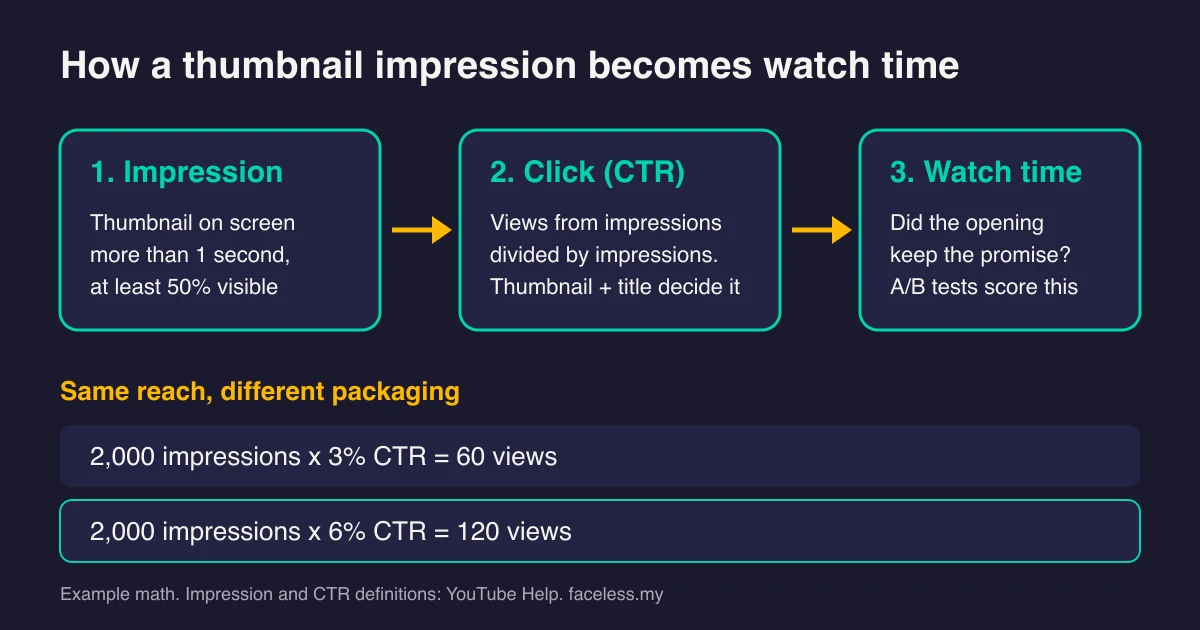
Then learn what the number includes. YouTube registers an impression only when a thumbnail stays on screen for more than one second with at least 50% of it visible (YouTube Help). Search, the home feed, subscription feeds, playlists, and Up Next recommendations all count.
Plenty does not count:
- Embeds and links on outside websites and apps
- The YouTube mobile website
- Cards and end screens inside the video player
- Email and notifications
- The YouTube Kids and YouTube Music apps
That matters if you promote on Reddit, Pinterest, or a blog. Those clicks add views but never touch CTR. A video can pull strong outside traffic and still show a weak CTR, because CTR only measures how YouTube’s own surfaces respond to your packaging.
Step 2: Read CTR Next to Impressions and Watch Time
CTR alone tells you little. Read it as a pair with impressions, then check whether the clicks stayed.
YouTube says a video with many impressions, such as one shown on the home page, will naturally have a lower CTR (YouTube Help). A falling CTR on a video with climbing impressions often means YouTube is showing it to colder viewers. That is reach growing, not the video failing.
Name the problem before you touch anything:
| What Studio shows | What it usually means | What to fix first |
|---|---|---|
| Very few impressions, any CTR | YouTube has not found an audience for the topic yet | Topic and demand, not the thumbnail |
| Impressions rising, CTR slipping | The video is reaching wider, colder audiences | Usually nothing. Watch average view duration |
| Steady impressions, CTR below your own median | Viewers see the video and pass on it | Thumbnail and title (Steps 4 to 6) |
| Healthy CTR, viewers drop off in the opening | The packaging promised something the opening did not deliver | Voiceover hook and first visual (Step 7) |
| Healthy CTR and healthy retention | Packaging and content match | Make more videos on that topic |
If YouTube is barely showing the video, CTR is not your problem yet. Run the free Zero Views Recovery Diagnostic first, and read the companion guide on YouTube impressions before you redesign a single thumbnail.
Step 3: Set a Baseline From Your Own Channel
There is no universal good CTR. YouTube says the rate varies by content type, audience, and where the impression appeared. It also recommends comparing CTRs between videos over the long term (YouTube Help).
So build your own benchmark:
- List your last 10 long-form uploads with their CTR for the default 28-day window.
- Take the median, not the average. One outlier drags an average around.
- Split by traffic source. In Studio’s advanced mode, group by traffic source and look at impressions CTR for Browse features, YouTube search, and Suggested videos separately.
Sources behave differently. YouTube notes that impressions from places like your channel page can produce a higher rate, since those viewers already chose you. A search viewer typed the question your title answers. A home-feed viewer asked for nothing. Compare like with like.
One faceless twist: if your channel mixes formats, such as stock-footage explainers and screen-recorded tutorials, benchmark each format on its own. A blended median hides which format is weak.
Step 4: Build Each Thumbnail Around One Faceless Focal Point
On-camera creators lean on a reaction face. You need a different anchor, and you need exactly one.
Strong faceless focal points:
- A single object tied to the topic: a cracked phone, a gold bar, a burnt pan.
- Hands doing the thing. UGC-style hand shots show action and scale without showing identity. The faceless UGC content guide covers how to film them.
- A before-and-after split with a hard line down the middle.
- A map, chart, or diagram with one element highlighted.
- One striking stock-footage frame or AI image, cropped tight so the subject fills the frame.
Design at full size, then judge it small. YouTube asks for a 16:9 thumbnail at least 640 pixels wide (YouTube Help), but many viewers meet it as a small card in a phone feed.
Drop your design into the free YouTube thumbnail preview tool to see it beside other videos at feed size. If you cannot name the focal point in one glance, the viewer cannot either.
Step 5: Write Thumbnail Text That Adds to the Title
Text-led thumbnails are the faceless default. They fail in one predictable way: the text repeats the title.
The title and thumbnail sit side by side in the feed. Treat them as one message split across two places:
- Title states the topic in the words people search: “Why Your Savings Account Loses Money Every Year”
- Thumbnail text adds the tension the title leaves out: “INFLATION WINS”
- Focal image makes it concrete: a dollar bill melting at the edges
Rules that hold up:
- Write for the one-second window. An impression registers after one second on screen. Use a few words a viewer can finish in about that time.
- Use one high-contrast pair. Bright text on a dark field, or dark text on a bright field. Not both.
- Never paste the full title into the thumbnail. You lose the second half of your message.
Draft title options with the free YouTube title generator. Then write the thumbnail line last, as the piece the title does not say.

Is the bottleneck broader than the faceless format? Audience.my owns general topic, packaging, distribution, and audience-growth systems when anonymity is not the defining constraint. Use the specialist route.
Step 6: Make Stock and AI Visuals Specific, and Keep Them Honest
Generic visuals get skipped. A stock skyline or an AI image of a glowing brain could sit on a thousand other videos. It gives the viewer no reason to pick yours.
Make the visual specific:
- Crop stock frames until only the detail that matters remains.
- Prompt AI images for one concrete scene from your video, not a mood.
- Add one annotation, such as an arrow, a circle, or a label, that points at the payoff.
The guide to the best AI thumbnail generators compares tools for this job.
Then check honesty. YouTube’s spam policy prohibits “maliciously misleading titles, thumbnails, descriptions, or imagery to trick users into clicking on a video” that does not deliver what it promised. An AI scene that never appears in the video buys one click and costs you the viewer. If your channel leans on AI, the YouTube inauthentic content policy guide shows where AI visuals cross the line.
Step 7: Pay Off the Click in the First Lines of Voiceover
A click is a promise. The opening seconds keep it or break it.
YouTube learned this early. Cristos Goodrow, YouTube’s VP of Engineering, wrote that the team found in 2011 that “clicking on a video doesn’t mean you actually watched it,” and added watch time to recommendations in 2012 (YouTube Official Blog, 2021). A high CTR followed by a fast drop-off does not help a video spread.
In a faceless video, the voiceover and the first visual carry the opening:
- Open on the thumbnail’s image, or the closest shot you have. The viewer should feel they landed in the right place.
- Make the first spoken line restate the thumbnail’s tension. If the thumbnail says “INFLATION WINS,” the first line says what inflation takes from a savings account.
- Cut the channel intro and logo sting. Start the payoff before you brand anything.

Script that first line before you record. The YouTube script outline guide shows how to plan beats so the hook and the packaging match. AI voiceover works the same way: the tool reads what you wrote, so the promise has to be in the script.
Step 8: Test Up to Three Versions With Test & Compare
Stop guessing between thumbnail ideas. YouTube’s Test & Compare lets you test up to three titles, three thumbnails, or three title-and-thumbnail pairs on one video (YouTube Help).
How it works:
- YouTube shows each version to different viewers and picks a winner by watch time share, not CTR.
- Tests can take a few days and should finish within two weeks.
- It runs in desktop YouTube Studio only. Shorts, scheduled lives, and premieres cannot be tested yet, and neither can videos made for kids, marked for mature audiences, or set to private.
Faceless channels have an edge here. Three variants cost minutes, not a reshoot. Swap the focal image, rewrite the thumbnail text, or recolor the background from the same source footage. Change one element per test so you know what moved the result.
When a winner comes back, write down why you think it won. After a handful of tests, that log becomes your channel’s own thumbnail rulebook.
Common Mistakes With YouTube CTR
These cost faceless channels the most time. Each one has a simple fix.
1. Judging CTR in the first hours
YouTube Help warns against deciding without enough data and against checking CTR right after upload. Early numbers swing hard. Give a video at least a week before you judge its packaging.
2. Chasing someone else’s “good CTR” number
A screenshot from another niche tells you nothing about yours. Your own median, split by traffic source, is the only fair comparison.
3. Changing the thumbnail, title, and topic at once
If CTR moves, you will not know why. Change one element, give it time, then decide. Test & Compare’s thumbnail-only and title-only modes make this easy.
4. Borrowing on-camera tricks that do not fit
A stranger’s stock-photo face pasted on to mimic a reaction shot sets up a person the video never shows. It also blurs your channel’s identity. Use an object, hands, or a diagram instead.
5. Fixing CTR when impressions are the problem
A 9% CTR on 80 impressions is about seven views. No thumbnail fixes that. If YouTube is barely showing the video, start with the Zero Views Recovery Diagnostic.
Frequently Asked Questions
What is a good CTR on YouTube?
There is no single good number. YouTube says half of all channels and videos land between 2% and 10% impressions CTR. Judge each video against your own channel’s median for the same traffic source, and expect CTR to drop as a video reaches wider audiences.
Why is my CTR going down while my views go up?
That is usually healthy. YouTube notes that videos with many impressions, such as those shown on the home page, naturally have a lower CTR. Wider reach means colder viewers. Check average view duration: if it holds, the video is spreading, not failing.
Does CTR matter for YouTube Shorts?
Less than for long-form. Viewers mostly meet Shorts in a swipe feed where the video starts playing on its own, so the first second does the job a thumbnail does elsewhere. Test & Compare does not support Shorts yet. If Shorts stall, read the guide on Shorts not getting views.
Can a faceless channel get a high CTR without showing a face?
Yes. CTR depends on whether the thumbnail and title promise something the viewer wants. A face is one way to signal that, not the only way. Faceless channels use a single focal object, hands, diagrams, and short text. Test & Compare picks winners by watch time share, which rewards clear, honest packaging.
Keep Reading
What to Do Next
Two-question check. Is the constraint anonymity (faceless format, voice-only, no on-camera)? Or generic growth levers (CTR, retention, packaging, topic clusters)? Pick the line that fits.
Free spreadsheet
Compare 75 faceless niches side by side
Sort all 75 by CPM range, competition, and production difficulty. Filter to what fits you and pick one.
Free. No spam. Unsubscribe anytime.
Generic growth? Audience.my owns that
If your stuck point is title, thumbnail, retention, or topic-cluster choice and anonymity is not the issue, Audience.my owns the cross-platform growth workflow.
Open Audience.my →