
In this article
Impressions count how often YouTube showed your thumbnail. One registers when the thumbnail stays on screen for more than one second with at least 50% of it visible, per YouTube Help. Low impressions mean YouTube has not found an audience for the video yet, or early viewers sent weak signals. On a faceless channel, the fix is not your face. It is the topic, the packaging, and the first seconds of your voiceover.
This guide shows where to find the number, how to read it, and what to change first. It covers long-form uploads. Shorts run on a different feed and a different metric, covered in why YouTube Shorts are not getting views.
What You’ll Need
- One published long-form video: public, not scheduled, private, or unlisted, and live for a few days so the first numbers have settled
- YouTube Studio on a computer: YouTube notes that some reports are not available on mobile
- The numbers from your last five uploads: impressions, click-through rate, and average view duration in a simple sheet, because you compare against your own channel, not a big creator’s
- The video’s thumbnail and title open in a second tab
- Twenty quiet minutes: this is a diagnosis, not a refresh-the-dashboard session
Step 1: Learn What Counts as an Impression
YouTube counts an impression only when someone could actually see your thumbnail on a YouTube surface. Plenty of places where your video appears never count.
| Counted as an impression | Not counted |
|---|---|
| YouTube homepage, including autoplay | Links and embeds on other websites and apps |
| YouTube search results | YouTube mobile website |
| Subscriptions, trending, history, and Watch Later feeds | YouTube Kids and YouTube Music apps |
| “Up next” recommendations beside the player | Cards and end screens inside the player |
| Playlists | Email and notifications |
| YouTube apps on computers, TVs, consoles, Android, iPhone, and iPad | Thumbnails less than half visible or on screen for under one second |
The full list sits in YouTube’s impressions help page.
This matters for faceless channels that lean on outside traffic. Post your stock-footage explainer in a Reddit thread, embed it on a blog, or send it to a newsletter, and you can get views with no impression behind them. A video can show more views than impressions. Nothing is broken. The views simply started outside YouTube.
If you produce faceless UGC clips for brands, the same logic applies. The impressions land on the brand’s channel, not yours. Ask the client for a screenshot of the video’s Reach tab before you judge whether your hook worked.
Step 2: Find Your Impressions in YouTube Studio
Open YouTube Studio. Click Content, pick the video, open Analytics, then the Reach tab. The top card shows thumbnail impressions, thumbnail impressions click-through rate, views, and unique viewers. Below it, “How viewers find this video” splits views by traffic source, per YouTube’s guide to video reach.
Three habits make the number useful:
- Set the date range to “Since published.” You want the full life of the video, not a slice.
- Read the label, not the position. YouTube keeps redesigning Studio. Look for “Thumbnail impressions” wherever it sits.
- Expect the numbers to disagree for a while. The summary card updates more often than the detailed report, per YouTube Help, so a gap between them in the first hours is normal.
Write the impressions, click-through rate, and average view duration into your sheet next to your last five uploads. One video’s number means little alone. The pattern across uploads is the signal.
Step 3: Read the Funnel, Not One Number
Impressions tell you reach. The funnel tells you why reach stopped.
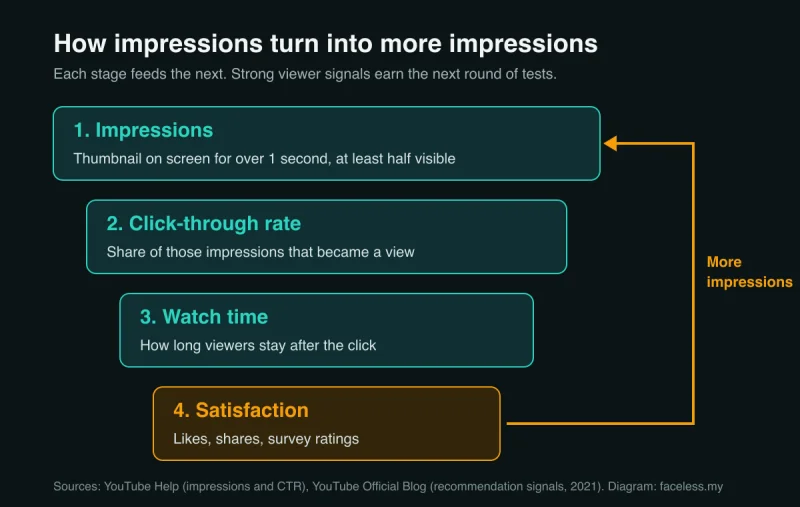
YouTube’s recommendation system leans on what viewers do after the thumbnail appears. Clicks, watch time, survey ratings, likes, shares, and dislikes all feed it, according to YouTube’s VP of Engineering Cristos Goodrow. The same post says the system’s job is to find the audience for each video.
In plain terms: every impression is YouTube placing a small bet. If the people who see your thumbnail click and stay, YouTube shows the video to more people like them. If they scroll past or leave early, the bets shrink. Low impressions are usually the end of that chain, not the start.
So read the funnel in order:
- Impressions: did YouTube show the video at all?
- Click-through rate: did the thumbnail and title earn the click?
- Average view duration: did the voiceover and visuals hold people?
- Impressions over time: did YouTube keep showing it, or stop?
For click-through rate, keep expectations realistic. Half of all channels and videos have an impressions CTR between 2% and 10%, and new videos or channels less than a week old, or videos with fewer than 100 views, can see an even wider range, per YouTube Help. The tactics for raising it live in our YouTube CTR guide. This page stays on impressions.
Step 4: Check Where the Impressions Came From
The traffic source card shows which YouTube surface tested your video. Each one runs on different signals.
- YouTube search: impressions come from matching a query. YouTube ranks search results on relevance, engagement, and quality, and checks “how well the title, tags, description, and video content match your search query,” per How YouTube search works.
- Browse features: the homepage and subscription feeds. Impressions here follow viewer interest and watch history.
- Suggested videos: your thumbnail beside or after other videos. Impressions here depend on how closely your video fits what those viewers already watch.
Faceless formats tend to split along these lines. Tutorial and explainer channels, such as software walkthroughs or finance explainers with screen recordings, often start with search. Story-led channels, such as history documentaries, true crime narration, or Reddit story videos over stock footage, depend more on browse and suggested traffic.
Knowing which surface you rely on tells you which fix to try. A search-led video with low impressions has a topic or wording problem. A browse-led video with low impressions has a packaging or retention problem.
Step 5: Match Your Pattern to the Right Fix
Most low-impression uploads fit one of five patterns. Find yours before you change anything.
| What you see | What it usually means | First fix |
|---|---|---|
| Zero impressions after a few days | A setting or a flag, not the algorithm | Confirm the video is public and processed, then open its Checks results for copyright claims on stock music or footage |
| A burst of impressions on day one, then flat | YouTube tested it and viewers did not bite | Packaging and opening (Steps 7 and 8) |
| A slow trickle, almost all from search | The topic has little search demand | Choose the next topic with more demand (Step 6) |
| Plenty of impressions, very few views | The thumbnail and title are not earning the click | The YouTube CTR guide |
| Healthy clicks, then impressions stop growing | Viewers leave early | The first seconds of the voiceover (Step 8) |
Pick one row. Make one change. If you change the topic, the thumbnail, and the intro at once, you will never know which one moved the number.
Diagnose the next fix before changing everything. Use the free Zero Views Recovery Diagnostic to decide whether to wait, fix packaging, adjust the topic, or keep publishing. Free diagnostic.
Step 6: Pick Topics YouTube Can Match to Viewers
No thumbnail can earn impressions for a video nobody wants. Fix the topic first.
YouTube Studio’s Trends tab (Analytics, then Trends) shows what viewers search for, mostly from the past 28 days. It also flags content gaps, which YouTube describes as searches where “viewers can’t find enough quality search results,” per YouTube Help on the Trends tab. Google is rolling out an updated Studio, so the tab may look different on your account.
Content gaps suit faceless production. You do not need to film, travel, or appear on camera to cover one. A gap you can illustrate with stock footage, screen recordings, or AI visuals is one you can publish quickly.
Two filters before you commit:
- Can you show it without borrowed clips? If the topic only works with someone else’s footage, you risk a monetization problem later. Check the reused content policy guide first.
- Does it fit your lane? A channel that posts a stoic quotes video, then a horror story, then an AI tools review hands YouTube three different audiences to test. Stay in one topic lane through your first uploads so each video teaches YouTube the same thing about who watches.
Step 7: Make the Faceless Thumbnail Readable in One Second
An impression counts after one second on screen. Treat that second as your whole window.

Faceless thumbnails cannot lean on an expressive face, so they need a different single focal point:
- One subject. A bold object, a striking AI-generated scene, or a single stock frame. Not a collage.
- High contrast. A dark subject on a light background, or the reverse. Small screens flatten low-contrast images.
- Three words or fewer. The title does the explaining. The thumbnail makes the promise.
Build the visual with an AI tool from our AI thumbnail generator roundup, then drop it into the free YouTube thumbnail preview tool to see it at feed size next to real videos. If you cannot tell what it shows at that size, neither can a viewer.
This step is about legibility, the bare minimum for an impression to turn into a decision. Testing and title formulas belong in the CTR guide.
Step 8: Win the First Seconds of the Voiceover
Watch time feeds the next round of impressions. A faceless video has no face to carry viewers through a slow start, so the voiceover and the first visuals do all the work.

Fix the opening in this order:
- Open on the payoff. Your first spoken line should repeat the promise from the title in different words. No “hey guys, welcome back.”
- Cut the logo sting and channel intro. New viewers do not know your channel yet. Every second of branding is a second they can leave.
- Match the first visual to the first sentence. If the first line names a sunken ship, the screen shows that ship, not a generic ocean loop.
- Change the shot early. Stock footage that sits on one clip feels static. Cut to a new clip, a zoom, or an on-screen label as the second sentence starts.
- Get the audio clean. Room echo and hiss push people away before the content can. Record in a quiet, soft-furnished room, or use a strong AI voice from our AI voice generator rankings.

Then check the result. Open the video’s Engagement tab and look at the audience retention graph. A steep drop in the opening seconds tells you the intro is the leak. A gradual slope tells you the opening worked and the impressions problem sits elsewhere.
Step 9: Keep Publishing and Leave Old Uploads Up
The urge after a flat upload is to delete it and try again. Do not.
Todd Beaupré, who leads YouTube’s homepage and recommendations product, put it bluntly: “Don’t delete videos unless you have a very, very good reason. When you delete a video, you delete your channel’s connection to the audience that watched that video.” He suggested keeping videos public, or unlisting them if you must, as reported by Search Engine Journal.
Instead, plan the next upload:
- Same topic lane as the video that earned the most impressions so far.
- One deliberate change from the pattern you found in Step 5.
- A note in your sheet recording what you changed, so the next comparison means something.
Judge each new video against the median of your last five, not against a viral video in your niche. A rising median means YouTube is learning who your faceless channel is for. That is the trend that matters through your first uploads.
Common Mistakes
These show up again and again on new faceless channels. Each one makes impressions harder to read or harder to earn.
1. Deleting and reuploading the same video
A reupload starts from zero and throws away whatever YouTube learned from the first version. Unlist if you must. Then make the next video better.
2. Rewriting tags instead of the title
YouTube says tags are useful mainly when your video’s subject is commonly misspelled, and “play a minimal role” in discovery otherwise, per YouTube Help on tags. Spend that time on the topic and the title.
3. Hiding AI disclosure out of fear it kills reach
If your video uses realistic AI visuals or a cloned voice, disclose it. YouTube states that “Disclosing AI content alone won’t limit a video’s audience or impact its eligibility to earn money,” per its altered or synthetic content help page. The same page says AI help with scripts, thumbnails, and titles does not need disclosure. For the monetization side, read the inauthentic content policy guide.
4. Comparing Shorts to long-form impressions
Shorts in the Shorts feed live on a different scale. YouTube counts a view the moment a video starts to play, Shorts included, and its reach report adds a “Stayed to watch” metric for Shorts. Compare Shorts with Shorts, and use the best length for YouTube Shorts guide when the feed is the problem.
5. Changing five things at once
New thumbnail, new title, new niche, and new voice in one week leaves you with no idea what worked. One change per upload keeps the signal clean.
Frequently Asked Questions
What is a good number of impressions on YouTube?
There is no universal number. Impressions scale with topic demand and channel history, so a niche software tutorial and a broad true crime story will never match. Compare each upload with the median of your last five. A rising median means YouTube is finding your audience.
Why does my new video have zero impressions?
Zero impressions after a few days usually points to a setting, not the algorithm. Confirm the video is public and finished processing, then open its Checks results for copyright claims on stock music or footage. If everything is clean, publish the next video in the same topic lane.
Should I change my thumbnail when impressions are low?
Only if impressions arrived and clicks did not. A thumbnail cannot fix a video YouTube never showed. When impressions are low across the board, change the topic on the next upload instead. When impressions are healthy but views lag, test a new thumbnail on the current video.
Keep Reading
What to Do Next
Published with zero views? Diagnose first. Don't reshuffle the channel until you know which lever is broken.
Get the Zero Views Diagnostic
Seven questions, five diagnostic stages, one specific fix for your next upload. Built for the first 10 uploads. Free PDF.
Free. No spam. Unsubscribe anytime.
Past upload 10?
If your channel has 10+ uploads and the issue is impressions plateau (not zero impressions), the growth guide is the better tool.
Read the Growth Guide