In this article
Your Short is stuck at one of three gates.
YouTube Shorts not getting views usually means one of three things. The Short never reached the Shorts feed. Viewers swiped away in the first seconds. Or the Short reads as reused or mass-produced. On a faceless channel, check the last two first: stock-footage openers, slow AI voiceovers, and re-cut clips look like every other Short in the feed.
Quick diagnosis: Open YouTube Studio and read two Shorts numbers. If “Shown in feed” is near zero, YouTube is not distributing the Short, so check format, copyright claims, and reused material. If the Short was shown but few viewers “stayed to watch,” the opening failed, so rebuild the first frame and tighten the voiceover.
Fix the first gate that failed. Leave everything else alone.
What You’ll Need
- YouTube Studio access on desktop or in the Studio app, so you can open per-Short analytics
- Your recent Shorts in one list, all in the same format, so you compare like with like
- The project files for each Short (script, voiceover, clips) so you can re-edit instead of starting over
- A notes doc to log the one change you make per upload and what happened
Step 1: Confirm YouTube Treats the Upload as a Short
Start with the boring checks. They take two minutes and rule out problems that have nothing to do with your content.
A Short needs a square or vertical aspect ratio and can run up to three minutes, per YouTube Help on three-minute Shorts. The three-minute limit covers uploads made on or after October 15, 2024. A horizontal upload, even a short one, is a regular video. It never competes in the Shorts feed.
Then check three things in YouTube Studio:
- Visibility says Public. Not Unlisted, Private, or Scheduled.
- The Restrictions column in the Content tab is empty. Copyright claims and age restrictions show up here.
- Traffic sources for the Short include the Shorts feed once it has any views at all.
The copyright check matters most once a Short passes one minute. YouTube blocks any Short longer than one minute that has an active Content ID claim, worldwide. A blocked Short can’t be played or recommended. YouTube says there is no penalty to your channel, and the Short comes back once the claim is resolved.
Laid a trending song under your narration? That is the likely culprit. Remove the claimed audio in the Studio editor, or dispute the claim if it was made in error. For the next upload, pull music from the YouTube Audio Library, which YouTube says won’t receive a Content ID claim.
Length itself is its own decision. The word-budget math lives in best length for YouTube Shorts.
Step 2: Read “Shown in Feed” Before You Change Anything
“Shown in feed” is the number of times your Shorts appeared in the Shorts feed, per YouTube’s Shorts analytics help page. It answers one question: did YouTube try?
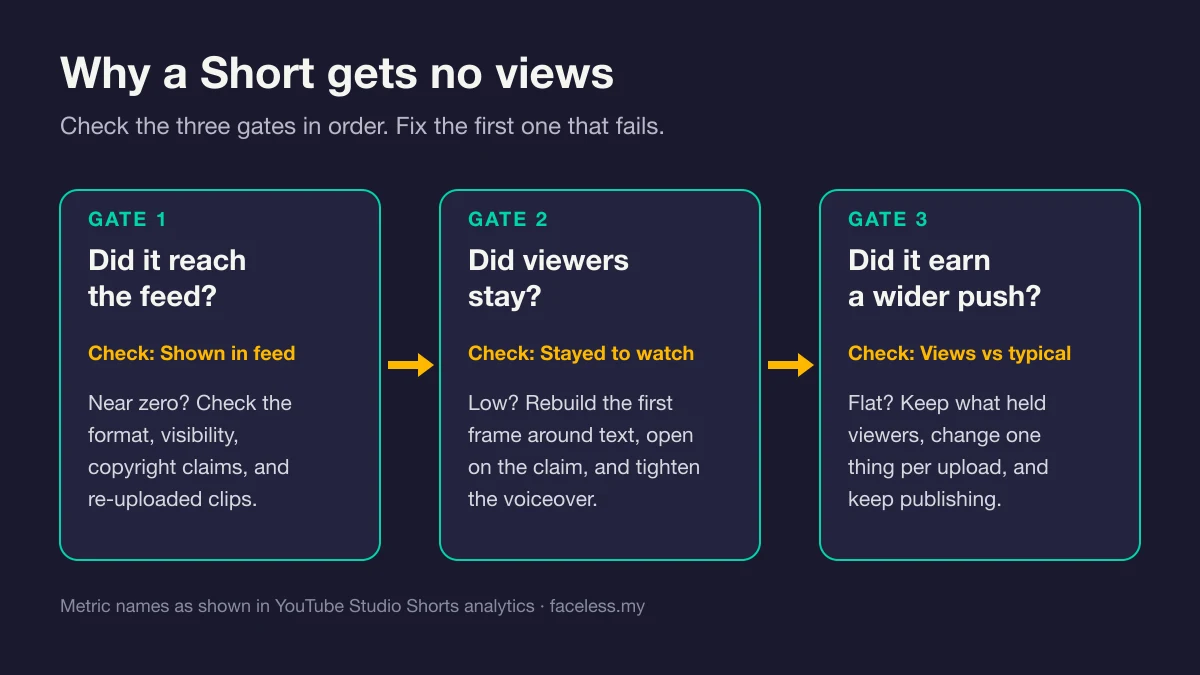
- Near zero: distribution stalled. Go back to Step 1, then jump to Step 6.
- Shown often, but few viewers stayed: distribution worked. Viewers rejected the opening. Steps 3 to 5 fix that.
Shorts start small. In a 2023 Creator Insider interview, Todd Sherman, YouTube’s product lead for Shorts, described the system as trying to “find a seed audience” of people who may enjoy a video. After that test, a Short “may get a lot more traffic or it may taper off,” per MediaPost’s report on the interview. He also said creators should worry less about when they post than about what they post.
So a Short with no views after one hour tells you very little. Its test may not have started yet.
One more thing changed this year. Since August 24, 2026, YouTube counts a view the moment a video starts to play, across Shorts, long-form, and live, per YouTube’s page on how views are counted. Partner Program earnings still use engaged views. A Short with plenty of views and few engaged views was shown, then skipped.
Coming from long-form? Impressions and click-through rate behave differently here. In the Shorts feed the video starts playing without a click, so your first frame does the job a thumbnail does in long-form.
Step 3: Check How Many Viewers Stayed or Swiped
The second number is “Stayed to watch.” YouTube defines it as “the percentage of times viewers stayed to watch past the initial seconds of a Short,” per its content performance help page. The Content tab shows a sibling figure, “How many chose to view”: viewed versus swiped away.
YouTube publishes no universal target for either. Your benchmark is your own channel. YouTube’s own tips say to compare videos of the same format and not to measure every video against a viral hit.
Use this table to match what Studio shows to the step that fixes it:
| What YouTube Studio shows | What it means | Fix first |
|---|---|---|
| No Shorts feed traffic at all | YouTube did not classify or serve it as a Short | Aspect ratio, length, visibility (Step 1) |
| Copyright claim on a Short over one minute | Blocked worldwide until the claim is resolved | Remove the claimed audio or dispute (Step 1) |
| Shown in feed near zero, no claim | Distribution stalled before or during the test | Audit reused and templated material (Step 6) |
| Shown in feed is healthy, Stayed to watch is below your usual | The opening lost the swipe | First frame and hook (Step 4) |
| Stayed to watch is normal, retention drops before the end | The middle drags | Voiceover pace and cuts (Step 5) |
| Every metric is normal for you, views stay flat | Topic or format ceiling | One variable per upload (Step 7) |
Rows four and five are the good news. Both are edit problems, not channel problems.
Step 4: Open on a Text-Led Frame, Not a Stock Clip
An on-camera creator can open with a reaction. You can’t. Your first frame has to carry the hook on its own.
Here is the faceless trap. Free libraries like Pexels and Pixabay are open to every creator, so the drone shot, ocean wave, or keyboard close-up you open on may already sit in someone else’s Short. A generic clip with no words says nothing, and the swipe is one thumb away.
Build the opening around text instead:
- Put the claim on screen in frame one. One short line, large, high contrast.
- Start the voiceover on frame one. The first spoken words match or sharpen the on-screen line.
- Make the visual prove the claim. A specific map, chart, screenshot, or archival photo tied to the topic. Not a mood shot.
- Keep text away from the bottom of the frame, where the title, channel name, and buttons sit on top of the video.
A quick before and after for a history Short:
- Weak: a slow pan across an old city. Voiceover: “Have you ever wondered what life was like back then?”
- Strong: frame one reads “The map that started a war.” The voiceover says the same words over a tight crop of that actual map.
The strong version tells the viewer what they get before they decide to swipe. The weak one asks them to wait.
Step 5: Tighten the Voiceover Pace
Slow narration is the second faceless leak. A face can hold a pause. A voice over stock footage can’t.
For reference, the average conversational rate for English speakers in the US is about 150 words per minute, per VirtualSpeech, citing the National Center for Voice and Speech. Time your voiceover against the script. If it runs long, the cause is usually dead air, not word count.
Run this pass on every Short:
- Cut the intro. No greeting, no channel name, no “in this video.” The first word is the hook.
- Delete the gaps between sentences in the edit. Silence that feels natural in a long video feels like a stall in the feed.
- Raise the speed setting on an AI voice that reads like an audiobook, then listen once more for clarity.
- Burn in captions that match the voiceover word for word, so the hook still lands with sound off.
- Change the visual on every new sentence. A new line over the same clip feels slower than it is.
Choosing a voice tool in the first place? The best AI voice generators for YouTube compares free and paid options for faceless narration.
Diagnose the next fix before changing everything. Use the free Zero Views Recovery Diagnostic to decide whether to wait, fix packaging, adjust the topic, or keep publishing. Free diagnostic.
Step 6: Remove Anything That Reads as Reused or Mass-Produced
This is the step generic Shorts advice skips.
On October 1, 2026, YouTube Creator Liaison Rene Ritchie announced in a Creator Insider video that Shorts recommendations will favor original content. Channels that mainly aggregate or re-upload other creators’ clips without significant changes lose reach. Per Search Engine Journal’s coverage, Ritchie said a remix needs more than “VO descriptions of what’s happening on screen, minor technical edits, or template-based bulk changes.”
Read that list as a faceless creator. Narration over someone else’s clip is a common faceless Shorts format. YouTube just said it is not enough.
Money follows the same line. YouTube’s Shorts monetization policies exclude non-original Shorts, re-uploads of other creators’ content, and compilations with no original content added. On July 15, 2025, YouTube renamed its “repetitious content” policy to “inauthentic content” and clarified that it covers repetitive or mass-produced videos, per its channel monetization policies.
Audit your recent Shorts with four questions:
- Is the main visual your own work (your script, your edit, your graphics), or another creator’s clip?
- Does each Short have its own script, or the same template with swapped nouns?
- Do several Shorts open on the same stock sequence?
- Is it a still-image slideshow under a voice read with no real edit?
A “yes” on questions 2 to 4, or “another creator’s clip” on question 1, is your fix list. Write a new angle, cut new visuals, and add analysis only you would add.
AI is not the problem. YouTube’s AI disclosure page says using AI for scripts, outlines, titles, or thumbnails needs no label, and neither does cloning your own voice. Realistic synthetic scenes do need the label. YouTube also states that disclosing AI content alone won’t limit a video’s audience. The risk is sameness, not the tool.
The full rulebooks live in the reused content policy guide for faceless channels and the inauthentic content policy guide.
Step 7: Change One Variable per Upload
Gates one and two pass, yet views stay flat? Now it is a topic or format question. Answer it with a controlled test, not a channel reset.
The feed is crowded. YouTube Shorts averages over 200 billion daily views, CEO Neal Mohan said at Cannes Lions 2025, per Tubefilter. One Short is a single swipe decision. A channel earns its place over many uploads.
Run the test like this:
- Pick one variable. The opening line, the first-frame text, the topic angle, the length, or the voice.
- Hold everything else steady. Same format, same visual style, same posting rhythm.
- Compare against Shorts in the same format. Studio’s Views card already compares each Short with your typical performance.
- Keep the winner. Repeat the version that held viewers, then test the next variable.
Log every change in your notes doc. After a handful of uploads, the pattern shows up in your own numbers instead of in Reddit guesses.
If the whole channel is new and every upload sits near zero, the problem may sit upstream of any single Short. The faceless YouTube Shorts production guide covers format choice and batching. Past the early stage and stuck on a plateau? The faceless channel growth guide is the better next read.
Common Mistakes When Shorts Get No Views
1. Deleting and re-uploading the Short
A re-upload is a new video with no history, and the old one’s data disappears with it. Fix the next Short instead. Keep the old one public unless it carries a claim or breaks a policy.
2. Judging a Short in its first hour
Sherman described Shorts distribution as a seed-audience test first. A dead first hour can mean the test has not run yet. Read “Shown in feed” before you read anything into the view count.
3. Chasing posting times and hashtags
Sherman said timing matters less than content, outside breaking news. He also said hashtags are not required and help mainly when tied to a real-world event or specific topic. Spend that energy on the first frame.
4. Opening every Short on the same stock pack
One downloaded clip pack, reused across a whole channel, makes every Short look alike. It also edges toward the template sameness YouTube now pushes down. Source fresh visuals per Short.
5. Reading the public view count as the score
Since August 24, 2026, a view counts the moment playback starts. That number flatters a Short viewers skipped. “Stayed to watch” and engaged views tell you whether anyone actually watched.
Frequently Asked Questions
Are my YouTube Shorts shadowbanned?
YouTube documents no “shadowban.” It does document three things that cut Shorts reach: blocks on Shorts over one minute with an active Content ID claim, reduced reach for re-uploaded content, and restrictions shown in Studio’s Content tab. If “Shown in feed” is above zero and the Restrictions column is empty, YouTube is serving the Short.
Should I delete Shorts that got no views?
No. Deleting removes the only data you have about what failed. Leave the Short public unless it has an unresolved claim or breaks a policy, and apply the fix to your next upload. Compare the two in Studio to see whether the change worked.
Do AI voiceovers stop Shorts from getting views?
Not by themselves. YouTube says disclosing AI content alone won’t limit a video’s audience, and cloning your own voice needs no disclosure. The reach risk comes from what the voice sits on: narration describing another creator’s clip, or the same template repeated across every upload.
Keep Reading
What to Do Next
Published with zero views? Diagnose first. Don't reshuffle the channel until you know which lever is broken.
Get the Zero Views Diagnostic
Seven questions, five diagnostic stages, one specific fix for your next upload. Built for the first 10 uploads. Free PDF.
Free. No spam. Unsubscribe anytime.
Past upload 10?
If your channel has 10+ uploads and the issue is impressions plateau (not zero impressions), the growth guide is the better tool.
Read the Growth Guide