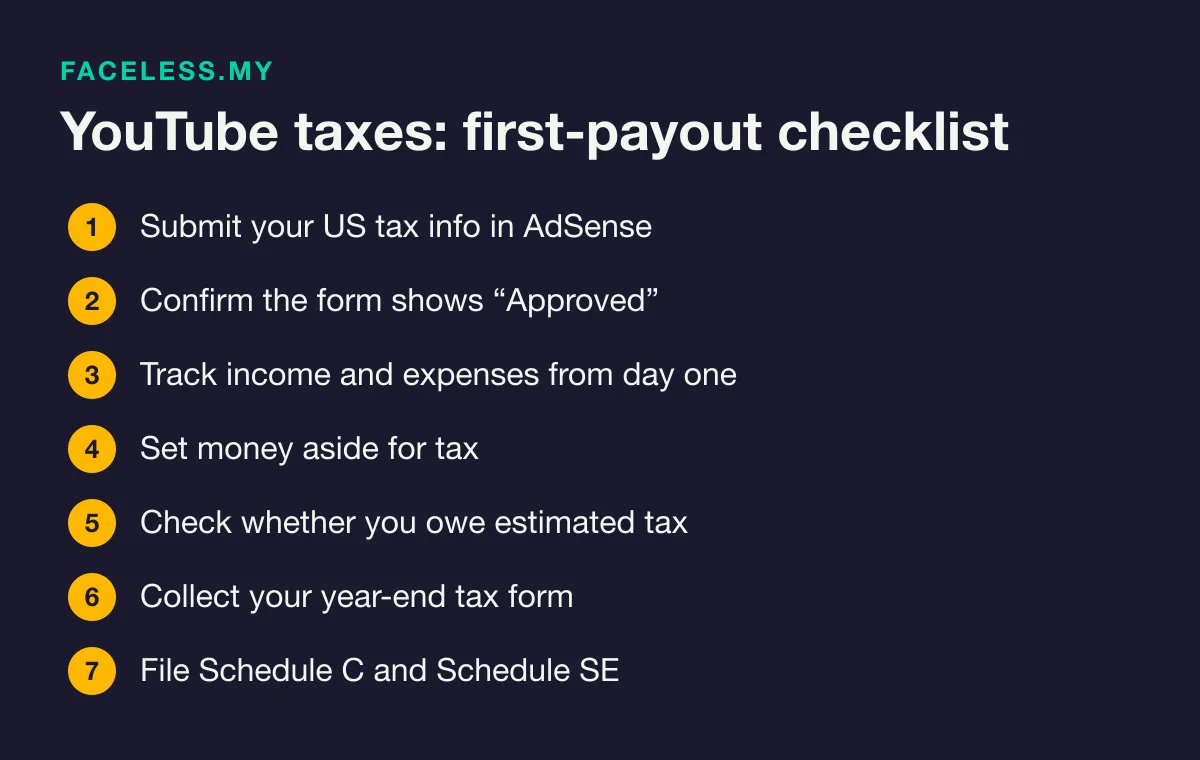
In this article
You got your first YouTube payout. Now the tax side starts.
Most new creators learn this the hard way, in December, when Google asks for a form or holds back part of the money. This checklist covers the US tax steps in order, from the AdSense form to Schedule C. It is general information, not personal tax advice.
What you’ll need
Gather these before you start. Each one saves you a stall later.
- A Google account with an AdSense for YouTube payments profile (you get one when you join the YouTube Partner Program)
- Your legal name and permanent address, exactly as they appear on your tax records
- Your Social Security number or taxpayer ID, if you are a US individual
- A separate bank account or card for channel income and costs
- A spreadsheet or bookkeeping app to log income and expenses
- Last year’s tax return, if you filed one, for the estimated-tax check in Step 5
Not yet in the Partner Program? Start with the YouTube monetization requirements first. This article is for the point where money is about to arrive or already has.
What are YouTube taxes?
YouTube taxes are the US tax duties that come with Partner Program earnings: a tax form filed with Google, self-employment tax, income tax, and sometimes quarterly estimated payments. The IRS sets the self-employment tax rate at 15.3% and says it applies once net earnings from self-employment reach $400. Source: IRS self-employment tax page.
Google requires tax info from every monetizing creator in the Partner Program, wherever they live. That is why the form comes first in the checklist below.
Think of it as two separate jobs. Job one is the form you give Google, so Google knows how to treat your payments. Job two is your own return with the IRS, where you report what the channel earned and pay tax on what it kept.
A faceless channel changes none of this. The IRS does not care whether you appear on camera. It cares that income arrived.
Step 1: Submit your US tax info in AdSense
Submit your tax form in AdSense for YouTube before 10 December each year. Google says all monetizing creators must provide tax info, and that without it Google may be required to deduct up to 24% of total earnings worldwide. US individuals use Form W-9. Source: YouTube Help, U.S. tax requirements.
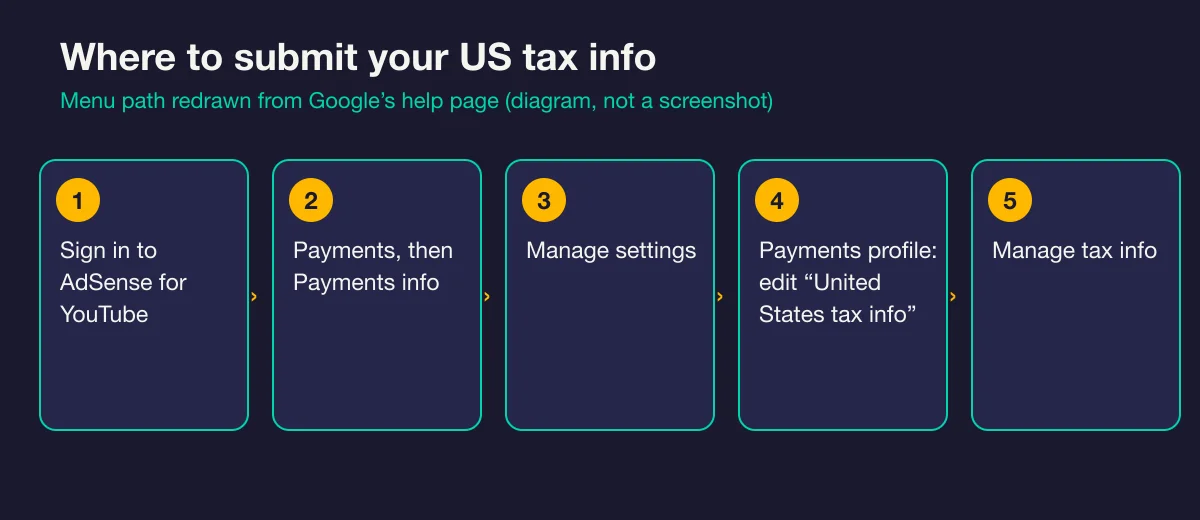
The menu path, per Google’s help pages:
- Sign in to your AdSense for YouTube account.
- Click Payments, then Payments info.
- Click Manage settings.
- Scroll to Payments profile and click edit next to United States tax info.
- Click Manage tax info. A guide on that page helps you pick the right form.
Timing matters for your wallet too. Google’s AdSense help says to submit your tax information before the 20th to be paid in the same month, and that a form filed after the 20th pushes the payment to the next cycle. See Google’s page on submitting your US tax info.
Use only Latin characters in the form, because Google says the IRS requires it.
Step 2: Confirm the form shows “Approved”
Submitting is not the same as being accepted. Google tells creators to double-check that the tax form status reads a green “Approved” in AdSense for YouTube, and that forms expire at the end of the third full calendar year after the year you signed. Source: YouTube Help, U.S. tax requirements.
Open the tax section again a day later. If the status is anything but Approved, fix it now, not in January.
Put a reminder in your calendar for the expiry year. Google says creators must re-submit even when nothing has changed. If you move, update both the permanent residence address and the legal address, and US creators must resubmit the W-9 with the new legal address.
Your name works the same way. Google’s help notes that the name on your payments profile is not linked to your tax forms, so a name change means updating both.
Step 3: Track income and expenses from day one
Keep every channel dollar in one place. The IRS says self-employed people generally use Schedule C to work out net earnings, and net earnings equal gross income minus ordinary and necessary business expenses. Clean records are how that subtraction holds up. Source: IRS Topic no. 554.
Open a separate account or card for the channel. Log each AdSense payment as it lands. Log each cost as you pay it: editing software, voiceover tools, stock footage, music licences, a domain.
Save the receipt, then write a one-line note on what the cost was for. Which costs qualify is a question for a tax professional. Good records make that conversation take ten minutes instead of two hours.
Your YouTube Analytics also shows revenue. Google warns that tax withholding amounts do not appear in YouTube Analytics, so treat the AdSense payments report as your record of what was paid and withheld.
Step 4: Set money aside for tax
Move a slice of each payout into a tax pot before you spend any of it. The IRS sets self-employment tax at 15.3%, made of 12.4% for Social Security and 2.9% for Medicare, and that sits on top of your regular income tax. Source: IRS self-employment tax page.
No payer takes this money for you. If you have a day job, your employer withholds tax from your salary, but nobody does that for channel income when Google is not withholding.
Two details soften the number. The IRS taxes 92.35% of your net earnings for self-employment tax, according to Topic no. 554. It also lets you deduct one-half of the self-employment tax when figuring your adjusted gross income.
What share to set aside depends on your total income, your state and your deductions. We do not give a universal percentage here because any single number would be wrong for many readers. A tax professional can give you yours after one look at last year’s return.
Ready to choose what this audience should buy? OfferEngine.my owns offer selection and product monetization when the faceless format is no longer the main problem. Use the specialist route.
Step 5: Check whether you owe estimated tax
Most self-employed people pay tax in quarterly installments called estimated tax. The IRS says individuals, including sole proprietors, generally must pay if they expect to owe $1,000 or more when they file. The fourth 2026 payment is due 15 January 2027. Source: IRS estimated taxes.
You can generally avoid the underpayment penalty if you owe less than $1,000 after withholding and credits, or if you paid at least 90% of this year’s tax or 100% of last year’s, whichever is smaller. That is the IRS’s wording on its estimated taxes page, which also notes special rules for higher-income taxpayers.
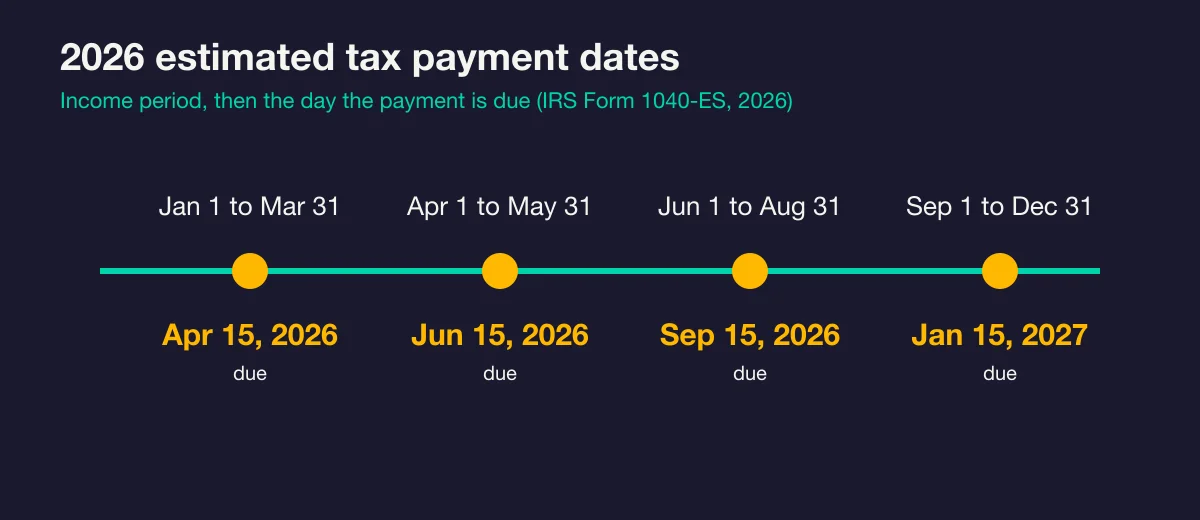
The IRS divides the year into four payment periods. Here are the dates from the IRS and the 2026 dates from the form instructions:
| Income period | Due date (general rule) | 2026 tax year date |
|---|---|---|
| 1 January to 31 March | 15 April | 15 April 2026 |
| 1 April to 31 May | 15 June | 15 June 2026 |
| 1 June to 31 August | 15 September | 15 September 2026 |
| 1 September to 31 December | 15 January of the following year | 15 January 2027 |
Sources: IRS estimated tax FAQ for the periods, 2026 Form 1040-ES for the 2026 dates.
One exception helps late starters. The 2026 form instructions say you do not have to make the 15 January 2027 payment if you file your 2026 return by 1 February 2027 and pay the entire balance due with it.
If a due date lands on a weekend or legal holiday, the IRS accepts the next business day.
Did your channel only start paying this autumn? Then the January payment may be your first and only one for 2026. The 2027 dates follow the same pattern, but confirm them against the 2027 Form 1040-ES once the IRS publishes it.
Step 6: Collect your year-end tax form
Google sends year-end tax forms to creators who submitted tax info and received eligible payments. Its help page says 1099-MISC forms for US creators are typically issued by early March, and that forms such as the 1042-S go out on or before 14 April. Source: YouTube Help, U.S. tax requirements.
Find your documents under Settings, then Manage tax info in the AdSense tax tool. You can choose online delivery or paper mail. If you pick paper, Google sends it to the mailing address on your tax form, which is another reason Step 2 matters.
Missing a form? Google’s AdSense help says requests for a copy or revision of a 1099-MISC or 1099-K for US-based persons are not accepted before 5 February of the current year. Use Google’s 1099 form help when that date passes.
Do not wait for the form to know you earned money. Your payments report already shows what Google paid, and you report your net earnings whether or not a form arrives.
Step 7: File Schedule C and Schedule SE with your return
Sole proprietors report channel income and costs on Schedule C, then work out self-employment tax on Schedule SE, both attached to Form 1040. The IRS says you must file a return if net earnings from self-employment were $400 or more. Source: IRS Self-Employed Individuals Tax Center.
The flow is short. Schedule C turns your income and expenses into a net profit or loss. Schedule SE takes that figure and works out self-employment tax. Form 1040 then pulls both together with the rest of your income.
If you run the channel through an LLC or another entity, the form set can change, so check with a tax professional before you file.
Want a realistic income figure to plan around? Read how YouTube pays per view, then look at the other ways to monetize a faceless YouTube channel that will land on the same Schedule C.
How much tax does Google withhold on YouTube earnings?
It depends on whether you submitted a form and where you live. Google says US creators with valid tax info are not withheld from, while without any info it may withhold up to 24% of total worldwide earnings. Creators outside the US who submit a form see 0% to 30% withheld on US-viewer earnings. Source: YouTube Help, U.S. tax requirements.
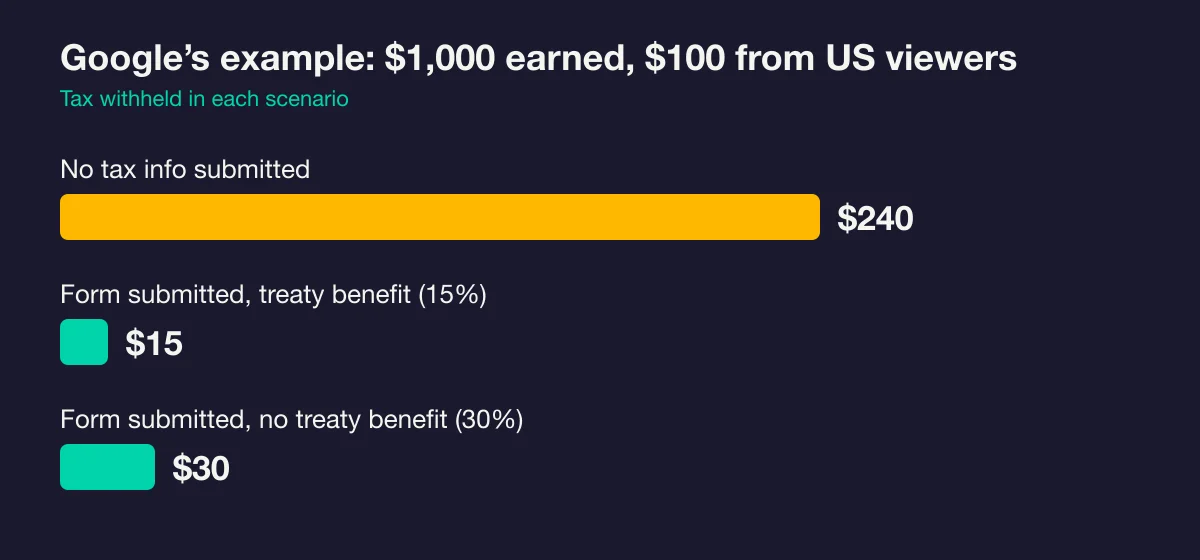
Google’s own example shows the stakes. A creator earns $1,000 in a month, and $100 of that comes from US viewers.
| Scenario | Tax withheld |
|---|---|
| No tax info submitted | $240 (up to 24% of all $1,000) |
| Form submitted, treaty benefit claimed at 15% | $15 |
| Form submitted, no treaty benefit at 30% | $30 |
Source: YouTube Help, U.S. tax requirements. In Google’s example the treaty and non-treaty rows are for a creator outside the US; the example uses India.
If you are a US creator, the lesson is the first row. Missing the form is the expensive mistake. Google says that once you provide valid info, its rates are adjusted in the next payment cycle.
Outside the US? Google says your location comes from the country of residence on your tax form, and your local tax laws may still apply. Ask a tax advisor about your treaty position.
What mistakes do new YouTube creators make with taxes?
The five common mistakes are missing the 10 December form deadline, assuming Google’s withholding is your whole tax bill, mixing channel and personal money, ignoring the $400 threshold, and letting an expired form lapse. Each one is avoidable with the checklist above. Sources: Google, IRS.
1. Missing the 10 December form deadline
Google says to submit by 10 December each year. Late forms leave you open to the highest withholding rate. If you have not filed, do it this week.
2. Thinking withholding settles everything
For US creators with valid tax info, Google does not withhold. Your tax bill still exists, and it arrives with your return. Tax is your job to set aside, which is why Step 4 comes before you spend.
3. Mixing channel money with personal money
One account makes Step 3 painful. Separate accounts turn year-end into an export and a total.
4. Ignoring small earnings
The IRS says self-employment tax applies once net earnings from self-employment reach $400 or more. Low earnings can still create a return to file. Check the amount, not the feeling.
5. Letting your form expire
Google says tax forms expire at the end of the third full calendar year after the year of signing. Re-submit in the expiry year, even when nothing changed.
Frequently Asked Questions
Do you have to pay taxes on YouTube earnings?
Yes. Money from the YouTube Partner Program is income. If your net earnings from self-employment were $400 or more, the IRS says you owe self-employment tax and must file a return. Google withholds tax only where its rules require it, so a payment arriving untaxed does not mean nothing is owed.
Does YouTube take taxes out of your payments?
For US creators with a valid tax form, Google says it does not withhold tax on earnings. Without a form, Google may withhold up to 24% of total worldwide earnings. Creators outside the US who submit a form see withholding of 0% to 30% on earnings from US viewers.
When are estimated taxes due for YouTube income in 2026?
The fourth and last 2026 payment is due 15 January 2027, covering income from 1 September to 31 December 2026. You can skip it if you file your 2026 return by 1 February 2027 and pay the whole balance with it. Earlier 2026 dates were 15 April, 15 June and 15 September.
Keep Reading
- YouTube Monetization Criteria: The Full Eligibility Checklist
- How Much Does YouTube Pay Per View?
- How to Make Money With a Faceless YouTube Channel (7 Ways)
- YouTube Shorts Monetization: How the Revenue Share Works
Facts in this guide come from Google and IRS pages read on 26 November 2026. Tax rules change and your situation is your own. Confirm details with the IRS or a qualified tax professional before you file.
What to Do Next
Three-way fork by channel state. Pre-traction (no channel or zero views)? Start with channel choice. Faceless channel with traction? Stack revenue paths by niche. Building a digital product to sell? Different workflow entirely.
Free spreadsheet
Compare 75 faceless niches side by side
Sort all 75 by CPM range, competition, and production difficulty. Filter to what fits you and pick one.
Free. No spam. Unsubscribe anytime.
Selling products? Go to OfferEngine
If the real question is which digital product to build, price, and position, OfferEngine.my owns the offer-architecture workflow. Anonymity does not change product design.
Open OfferEngine.my →Faceless with traction · Channel Launch Pack
If anonymity stays central and you want to scale a faceless channel into reliable revenue, the Channel Launch Pack covers 10 cloneable channels with topic supply for AdSense plus affiliate paths.
$9 $19 53% off Lowered for first-time creators.